.png)
What is Web Design How to Build a Lead Generating Website
This article explains what web design really means for small and mid-sized businesses and why a well-designed site is essential for growth and lead generation....
Every small business owner dreams of steady growth and finding new customers.

In today’s world, where everyone looks for things online, your business website is often the very first thing people see. But sometimes, these websites don’t work as well as they should. This is where good web design comes in.
Why web design matters for small and mid-sized businesses
So, what is web design, really? At its simplest, web design is about planning and building websites that are both easy to use and nice to look at. It’s not just about pretty pictures. It’s also about how everything works together to give visitors a smooth and clear experience [1]. Good web design combines how a site looks, how it feels, and how it works for people who visit it [2]. It brings together visual creativity and smart technical solutions [3].
For small and mid-sized businesses, having a great website isn’t just a nice-to-have; it’s a must. A well-designed site helps your business grow and brings in new potential customers, also known as lead generation. Think of your website as your best salesperson, working 24/7. It needs to clearly tell people what you do, why you’re good at it, and how they can get in touch or buy from you. This is a crucial part of your overall digital marketing strategies for businesses.
Many small businesses face a few big problems with their websites. Maybe your current site is like an old "brochure website." It just sits there, showing information, but it doesn’t actually help you get new leads or sales. Visitors might come, look around, and then leave without doing anything important for your business. This is called poor lead conversion. You need your small business website to convert visitors to customers.
Another common pain point is the cost. Finding a good web design and development agency can seem expensive, especially if you’re worried about the overall website design cost and whether you’ll get real results. Many businesses end up with high upfront costs and then still don’t see the leads they hoped for. The goal is to build a lead generating website that works hard for you.
If you’re ready to make your website work smarter for your business and bring in more customers, it’s time to think about a better approach.
Ready to see how your website can bring in more customers? Grow Your Traffic on Autopilot
Your website needs to be more than just a digital brochure; it needs to be a tool that actively helps your business grow. This starts with understanding what web design truly means.
What is web design? Definition, disciplines, and scope
At its core, web design is the careful process of planning, sketching out, and putting together content on websites. It’s about making sure a website looks good and works well for visitors Web Designing. Think of it as a blend of art and science, mixing how things look with how they work for people What is Web Design? | SNHU.

A web designer works at the point where creative ideas meet technical solutions What Is a Web Designer? The Complete Guide to the Role in 2026.
When we talk about "what is web design," we’re really looking at several key parts that all work together:
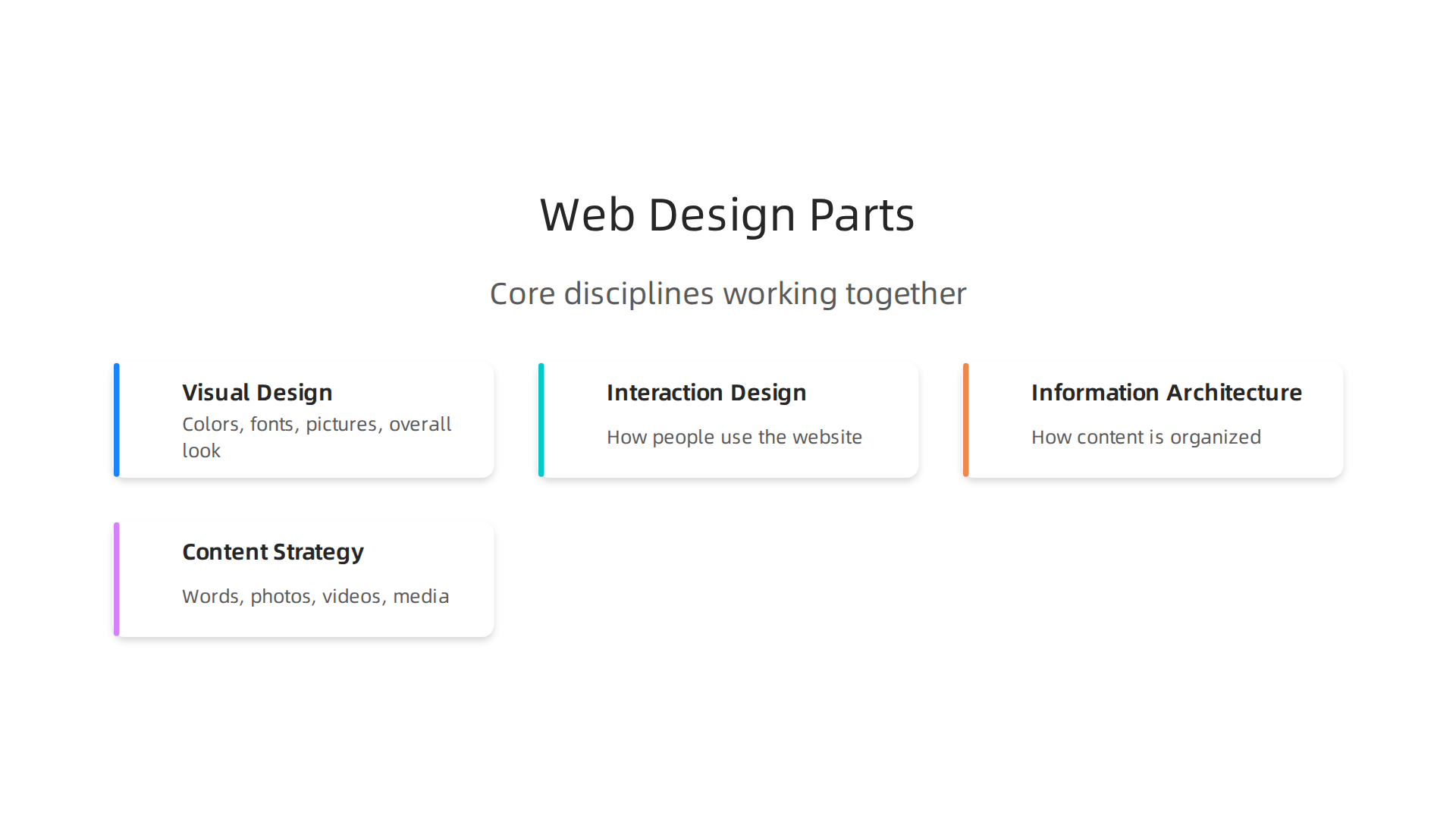
- Visual Design: This is what most people first think of. It includes the colors, fonts, pictures, and overall look and feel of a site. Good visual design makes your website appealing and easy on the eyes. It helps your brand stand out and makes a good first impression. You can learn more about how to use colors and images to grab attention in articles about graphic design principles that turn your website into a lead generator.
- Interaction Design: This part focuses on how people use the website. How do buttons work? What happens when you click something? Is it easy to find what you need? This makes sure the website is simple and enjoyable to use. Building trust through how users interact with your site is key, as discussed in designing UX for trust transforms website visitors into customers.
- Information Architecture: This is about how all the content on your website is organized. It’s like creating a clear map so visitors can easily find specific pages, products, or information. A well-organized site keeps people from getting lost.
- Content Strategy: This covers the words, photos, videos, and other media on your site. It makes sure the content is helpful, easy to understand, and helps you reach your business goals.
Web Design vs. Other Digital Roles
It’s important to know that web design is not the same as every other job that touches a website. While they work closely together, these roles are different:
- Web Development: Web design focuses on the look and feel, but web development is about the code that makes the website actually work. Developers build the engine, while designers create the car’s body and interior. If you’re looking for someone to handle the technical build of your site, you might be looking for a website development services company for real business growth.
- User Experience (UX) Research: This is about truly understanding what users need and want before any design even starts. UX researchers talk to people, test ideas, and gather information to make sure the website solves real problems for its users. A web designer then uses this research to create the actual design. Sometimes, a role called a UI/UX designer for small business lead generation covers both these areas.
- Digital Marketing: This is all about getting people to your website. It includes things like search engine optimization (SEO), social media campaigns, and online ads. While web design makes the website good once people arrive, digital marketing brings them there in the first place. These strategies are crucial for business growth and are detailed in digital marketing strategies for businesses proven tactics for SMB growth.
In short, "what is web design" covers the whole process of creating a website that looks great, works perfectly, and helps your business connect with customers. It’s a key part of your business success in 2026.
To build on that idea, a truly successful website, one that looks great and works perfectly to help your business, depends on several key parts working together. These are User Experience (UX), User Interface (UI), content strategy, and accessibility. Each of these components plays a huge role in turning visitors into customers and helping your site show up higher in search results.
User Experience (UX)
User Experience, or UX, is all about how easy and pleasant your website is for people to use.

It asks questions like: Can visitors quickly find what they’re looking for? Is the site simple to navigate? Do they feel good while using it? Good UX means your website feels intuitive and smooth. When people have a good experience, they stay longer, explore more, and are more likely to take actions like buying a product or filling out a contact form. This leads directly to more conversions for your business. Also, search engines like Google notice when users enjoy a site, which helps your website’s search engine optimization (SEO) and ranking.
User Interface (UI)
User Interface, or UI, is the visual part of UX. It’s about how everything on your website looks and how people interact with it. This includes the buttons, text, images, sliders, and all other visual elements. UI design makes sure that these elements are clear, attractive, and easy to understand. For example, a well-designed button makes it obvious it’s meant to be clicked. Good UI guides visitors through your site, making it easy for them to convert into customers. A strong UI, combined with good UX, makes your site stand out and helps people connect with your brand. To understand more about the visual elements, check out what is UI design: the simple definition that boosts your bottom line.
Content Strategy
Content is the heart of your website. It’s the words you use, the pictures you show, and any videos or sounds you include. A smart content strategy makes sure all this information is helpful, clear, and speaks directly to your ideal customers. It isn’t just about having information; it’s about having the right information presented in the right way to solve your visitors’ problems. When your content is valuable and easy to read, visitors see your business as trustworthy and knowledgeable. This trust often leads to conversions. Also, high-quality, relevant content is a big factor for SEO, helping search engines understand what your site is about and show it to more people.
Accessibility
Web accessibility means making sure your website can be used by everyone, including people with disabilities. This might mean adding text descriptions for images, providing captions for videos, or making sure the site can be navigated using only a keyboard. In 2026, web accessibility is more important than ever. It’s not just about being fair; it’s also a legal requirement for many businesses and organizations Web Accessibility in 2026: Laws, Standards & Practices.
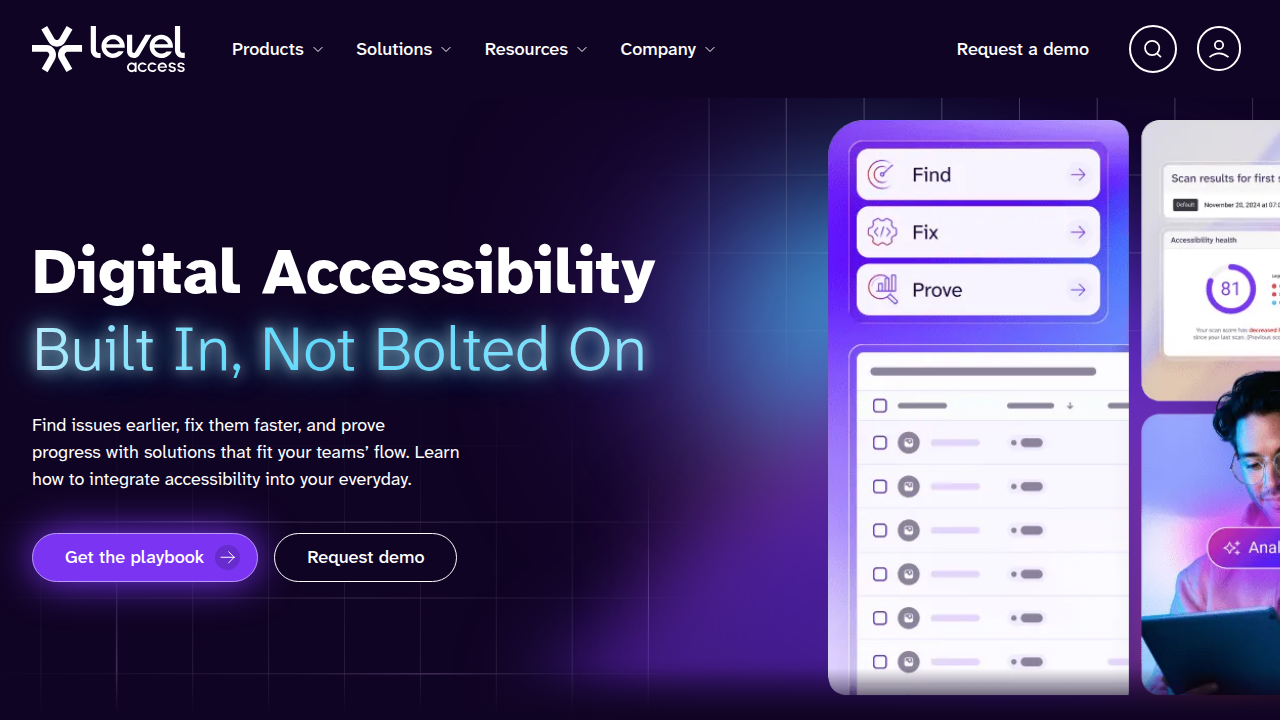
The main rules for this are found in the Web Content Accessibility Guidelines (WCAG) 2.2, which give clear steps to follow Web Accessibility Checklist 2026: WCAG 2.2 Compliance Guide.
By making your site accessible, you reach a wider audience, show your business cares, and improve your SEO because accessible sites are generally better structured and easier for search engines to understand.
These components of website design are not separate jobs but parts of one big effort to make a high-performing website. Great UI and UX make a site delightful to use, smart content gives people what they need, and accessibility ensures everyone can benefit. When a website successfully brings these elements together, it can truly convert visitors into customers, leading to consistent growth for small businesses. Learning about small business website conversion can further illustrate how these factors contribute to your bottom line, while strong SEO web design generates consistent leads for SMBs.
Putting together a successful website is like building a house. You wouldn’t just start nailing boards together without a plan, right? The same is true for "what is web design" in action. There’s a clear process that helps make sure your new site looks great, works well, and helps your business grow.
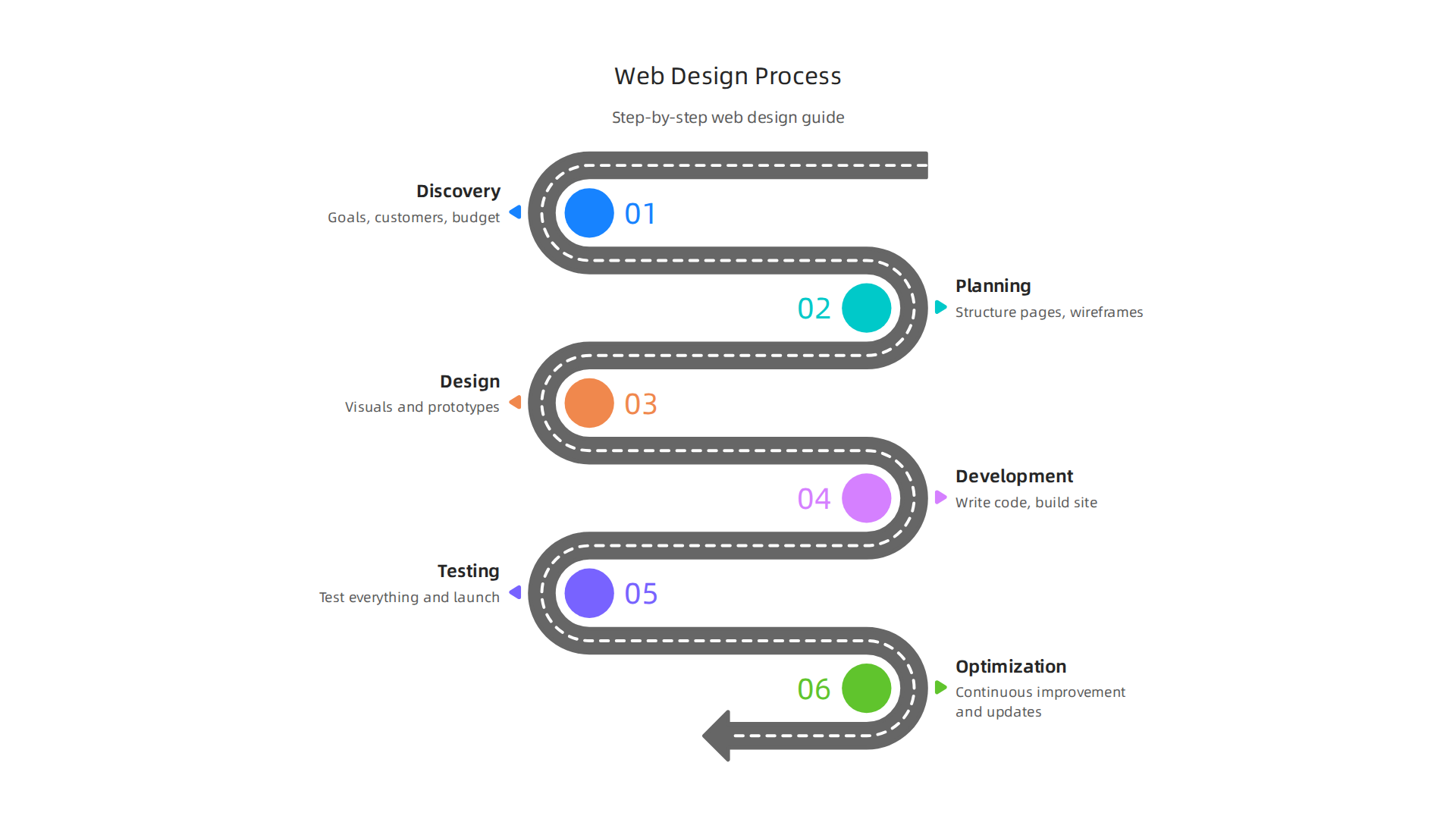
This process often includes research, making simple drawings called wireframes, creating detailed prototypes, and finally launching your site.
The web design process: research, wireframes, prototypes, and launch
A good "website design and development" process starts with understanding what you need. It’s not a one-time job, but a series of steps that build on each other.
1. Discovery and Research
This first step is all about learning. Your "web design and development agency" will work with you to understand your business goals, who your customers are, and what you want your website to achieve. This includes figuring out what pages your site will need and what your budget looks like for the "website design cost". Many important details like project goals and who approves what get decided here, as explained in a guide to the Web Design Process: Complete Guide From Discovery to Launch. This deep dive makes sure everyone is on the same page from the start.
2. Planning and Wireframes
Next, the team plans out the structure of your website. This is where they decide how all the pages will connect and what information will go on each page. Think of wireframes as simple blueprints or sketches of your website. They show where buttons, pictures, and text blocks will go, but without any colors or fancy designs. They help ensure the site is easy to use before any detailed design work begins.
3. Design and Prototypes
After the wireframes are approved, the fun visual part begins. Designers add colors, fonts, images, and other visual elements to create a beautiful look for your site. These designs become mockups, which are full-color pictures of what each page will look like. Then, they create prototypes. These are like clickable versions of your website that let you experience how it will feel before it’s actually built. You can click around, see how things move, and give feedback. This is a key time to test ideas and make changes easily.
4. Development
Once the designs and prototypes are perfect, developers start building the actual website. They write the code that makes your site work on the internet. This includes making sure it looks good on phones, tablets, and computers. This step turns all those plans and designs into a real, working website. If you are looking to create a site that truly generates leads, understanding how to build a lead generating website for small business growth is key.
5. Testing and Launch
Before your website goes live for everyone to see, it needs thorough testing. The team checks everything: that all links work, forms send messages correctly, images load fast, and the site works on different devices and browsers. This careful check ensures a smooth experience for your visitors. After all the checks, your new website is finally launched! This step involves making the site public and getting it ready for search engines. Testing is not just a final step; it’s an ongoing process to prevent issues, as detailed in a Web development process: a practical SMB guide.
6. Ongoing Optimization
Launching your website isn’t the end of the journey. A great website needs continuous care and improvement. This means watching how people use your site, making small updates to content, and finding ways to make it even better at attracting and converting customers. Ongoing work includes regular updates, security checks, and making sure your site stays fast. Many businesses find that working with a platform like Weblish can make this part easier, providing continuous support and insights to help your site grow.
If you’re ready to see how a professional approach to web design can transform your online presence and ensure consistent leads, you’ll want a partner who handles this entire process with expertise.
Ready to see how Weblish can help your business thrive online?
Grow Your Traffic on Autopilot
After your website is launched, the work isn’t truly over. Think of it like a car. It needs good maintenance to keep running well. The same is true for the important technical parts of your website. These include responsive design, how fast your pages load, and the basic setup for search engines.
These are not just fancy add-ons; they are fundamental to what is web design in 2026. They help your site get found and make visitors happy.
Technical foundations: responsive design, performance, and SEO basics
A truly great website needs strong technical foundations. Without them, even the most beautiful design might not work as well as it should. These technical choices directly impact how many people see your site and how easily they become customers.
Responsive Design
Imagine visiting a website on your phone, and everything is tiny or squished. You’d probably leave, right? That’s why responsive design is so important. It means your website changes and adapts to fit any screen size, whether it’s a large computer monitor, a tablet, or a small smartphone. A good web design and development agency always makes sure your site looks good and is easy to use on all devices. This makes sure every visitor has a good experience, no matter how they access your site.
Performance: How Fast Your Site Loads
Nobody likes to wait. If a website takes too long to load, people get bored and click away. This slow loading can really hurt your business. Fast-loading websites keep visitors happy and make them more likely to stick around and explore. Search engines also notice how fast your site is. A slow site can be pushed down in search results, making it harder for new customers to find you. Making sure your site performs well is a key part of the overall website design cost, but it pays off in more visitors and leads.
SEO Basics and Accessibility
Search Engine Optimization (SEO) helps search engines like Google understand what your website is about so they can show it to the right people. This includes technical details like making sure your site structure is clear and that search engines can easily "read" all your pages.
Another very important part of technical foundations is accessibility. This means making sure everyone can use your website, including people with disabilities. This might involve adding descriptions to images or making sure navigation is clear. In 2026, web accessibility is more important than ever. For example, standards like Web Accessibility Checklist 2026: WCAG 2.2 Compliance Guide help guide designers and developers to create sites that are usable by all. Ignoring these technical details means fewer people will find your site, and some visitors might not be able to use it at all. A professional website design and development agency knows that solid SEO web design generates consistent leads for SMBs and is built on these strong technical bones from the start.
Now that you know what goes into the technical side of web design, the next big question for your small or mid-sized business (SMB) is: how will you actually build your website? There are different paths you can take, and each has its own good and bad points. Knowing these helps you decide which way is best for your business. Let’s look at the options and what makes them different in terms of cost, how fast you can launch, how much you can change the design, who owns it, and if you get help later.
Choosing the right web design approach for SMBs: DIY, agency, template, or platform
Deciding how to build your website is a big step. It affects your budget, how quickly you can get online, and how much your site can grow with your business. Here’s a simple look at the most common choices.
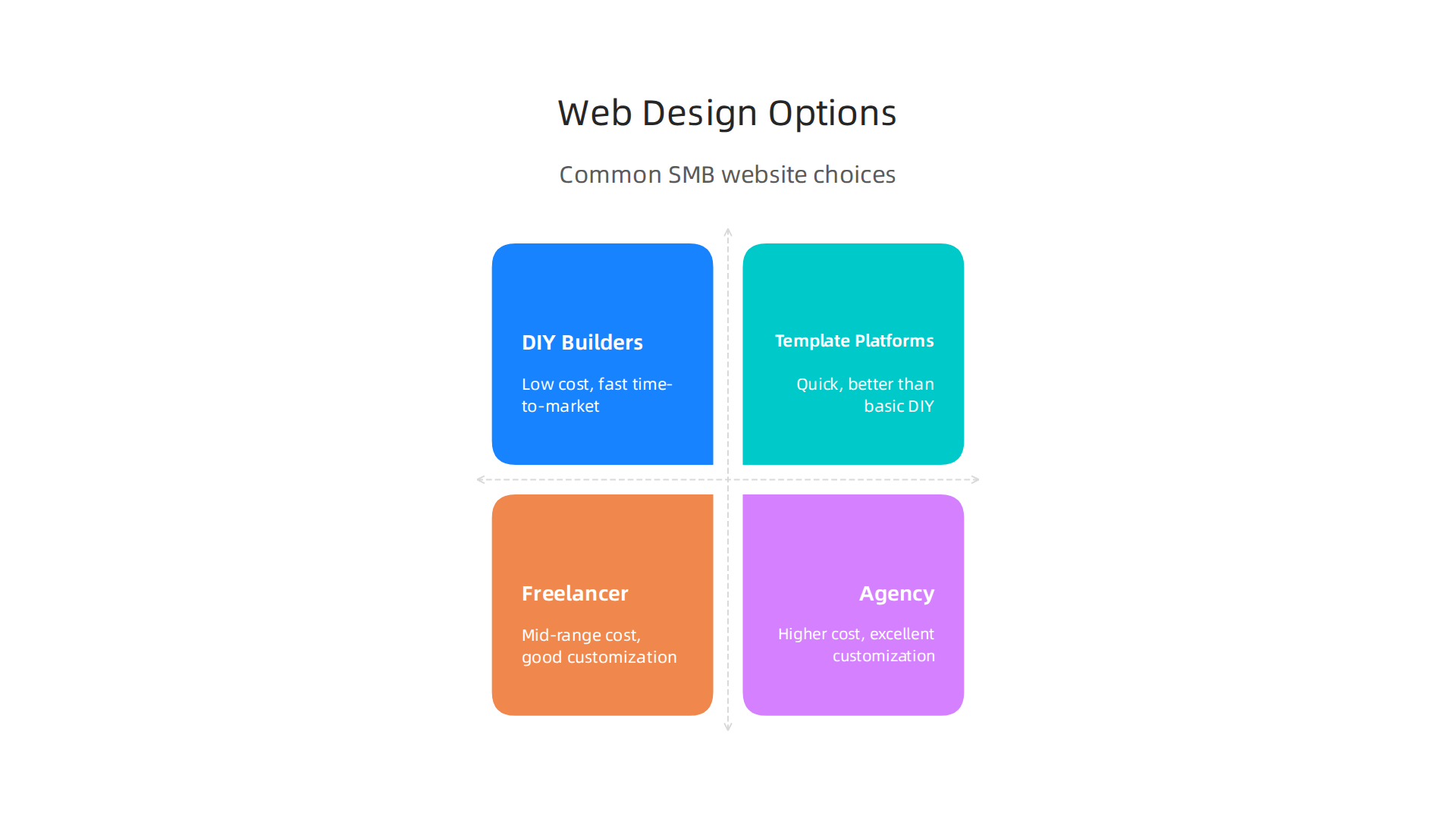
Do-It-Yourself (DIY) Website Builders
This is where you use tools like Wix or Squarespace. They give you easy drag-and-drop tools to build a site yourself.
- Cost: Very low. You might pay around $20 to $100 each month for the service, plus your own time. Some reports show annual costs between $200 and $800 a year for DIY builders in 2026, depending on the plan you pick Website Cost for a Small Business: 2026 Price Guide.
- Time-to-Market: Fast. You can get a basic site up quickly if you know what you want.
- Customization: Limited. You’re usually stuck with the design options they give you. You might not get the unique look or special features you need.
- Ownership: You own your content, but the website itself is tied to their platform. Moving it can be hard.
- Support: Basic help from the platform. You’re mostly on your own for design and marketing.
This option is great if you have a very tight budget and some tech know-how. You can also learn more about specific platforms like Wix website design for lead generation.
Template-Based Platforms (and AI Builders)
These are similar to DIY but often offer more powerful tools or a specialized focus. Many now include AI features to help you design faster.
- Cost: A bit more than basic DIY, but often still affordable. For example, some AI website builders might have monthly costs from $10 to $40 after an initial fee How Much Does a Small Business Website Cost in 2026?.
- Time-to-Market: Quick, especially with AI helping to suggest designs.
- Customization: Better than basic DIY, but still based on templates. You can change more, but truly unique elements can be hard.
- Ownership: Similar to DIY, you rely on their platform.
- Support: Can vary. Some platforms offer more guided support or "done-for-you" packages. You might explore how an AI website builder for small business can help.
Hiring a Freelancer
A freelancer is a single person you hire to build your website. They can offer more custom work than a DIY builder.
- Cost: Mid-range. Prices for a freelance designer typically range from $1,000 to $10,000 in 2026 How Much Does It Cost to Build a Website in 2026 ….
- Time-to-Market: Moderate. It takes longer than DIY, but often faster than a big agency.
- Customization: Good. A freelancer can create a more unique design tailored to your needs.
- Ownership: You typically own the website files once paid, but check your contract.
- Support: Varies greatly by the freelancer. Some offer ongoing help; others just build the site and move on.
Working with a Web Design and Development Agency
An agency is a team of experts who handle everything for you. They offer a full range of services, from design to marketing. This is often the best choice if you need a strong, lead-generating website.
- Cost: Higher upfront, but can save money in the long run. An agency build can cost anywhere from $5,000 to $25,000+ for a standard business website, with ongoing support often billed monthly Website Costs for Small Businesses: Real Pricing Breakdown (DIY ….
- Time-to-Market: Can be longer due to custom work and strategy, but the process is usually very clear.
- Customization: Excellent. Agencies create unique, custom websites that perfectly fit your brand and goals. This is often the best approach for what is web design when you need specific features.
- Ownership: You own the finished website and all its parts.
- Support: Comprehensive. A good website design and development agency provides ongoing maintenance, updates, and marketing support. They act as your long-term digital partner. When looking for partners, consider choosing a website development services company for real business growth.
How to Choose the Right Approach
When picking your path, think about these things:
- Your Budget: How much can you realistically spend upfront and each month?
- Your Time: How much time can you put into building and managing the site yourself?
- Your Needs: Do you need a simple online brochure, or a powerful tool to bring in new customers and leads?
- Your Tech Skills: Are you comfortable learning new software, or do you prefer to have experts handle it?
- Long-Term Goals: Do you want a website that can easily grow and change with your business over many years?
For small businesses aiming for serious growth, a strategic website design and development agency or a managed platform often makes the most sense. They turn your site into a true lead-generating machine.
Ready to see how a professional service can help your business thrive online?
Grow Your Traffic on Autopilot
Building a website is a big step, but it is not the last one. To keep your site working well and bringing in new customers, you need to take care of it all the time. This ongoing care is a crucial part of what is web design in 2026. It includes maintenance, looking at how people use your site, and making changes to get more leads.
Keeping Your Website Healthy and Safe
Just like a car, your website needs regular check-ups to run smoothly and stay safe. This is where ongoing maintenance comes in. It covers a few key areas:
- Updates: The software your website uses, like its main system (CMS) and any extra tools (plugins or themes), needs regular updates. These updates fix problems and, very importantly, close security holes. Missing these updates can leave your site open to hackers.
- Backups: Imagine losing all your website’s information. Regular backups save a copy of your site, so if anything goes wrong, you can quickly put it back the way it was. Many experts suggest weekly backups to keep your data safe, according to the Best Website Maintenance Plan For Small Businesses (2026).
- Security Checks: You should regularly scan your website for viruses or other harmful software. This helps catch problems before they cause serious damage. Running malware scans and checking for broken links are important tasks, as noted in The Only Website Maintenance Checklist You’ll Need in 2026. Making sure contact forms work also helps keep your website helpful for visitors.
- Speed: A slow website can make visitors leave before they even see your products or services. Keeping your site fast means checking its performance and fixing anything that slows it down.
Understanding Your Visitors with Analytics
Once your website is up, how do you know if it is actually working? This is where analytics tools come in. They collect information about your visitors, like:
- How many people visit your site.
- Which pages they look at the most.
- How long they stay on each page.
- Where they come from (like Google or social media).
Understanding these numbers helps you see what is working and what is not.

It is like having a map to guide your ongoing website design and development efforts.
Making Your Website Work Harder: Conversion Optimization
A pretty website is nice, but a website that brings in leads and sales is even better. This is the goal of conversion optimization. It means making changes to your site to turn more visitors into customers. For example, you might:
- Change the words on your "Contact Us" button.
- Move a sign-up form to a different spot on the page.
- Try different pictures or headlines.
You test these changes to see which ones get better results. This process of trying, checking, and improving is key for any small business wanting to grow. It is a major part of what a good small business website conversion strategy looks like.
Why Ongoing Work Drives Growth
Think of your website as a growing garden. You cannot just plant seeds and walk away. You need to water it, remove weeds, and help it grow. The same is true for your website. By continuously maintaining it, looking at your analytics, and optimizing for conversions, your website becomes a more powerful tool over time.
This continuous care helps you get more traffic and leads month after month. It turns your website from a simple online brochure into a true lead-generating machine. Choosing a good website design and development agency often means getting this ongoing support built into your plan, helping you avoid unexpected website design cost later on. By investing in this ongoing care, you make sure your initial investment in what is web design keeps paying off for years to come.
Costs, pricing models, and measuring ROI for SMB web projects
Making your website a true lead-generating machine means understanding not just what goes into good website design and development, but also how much it costs and how to make sure you get your money’s worth. For small and mid-sized businesses (SMBs), managing the website design cost is a big part of their overall business planning in 2026. Let’s look at common ways you might pay for a website and how to see if it is a good investment.
How Much Does a Website Cost and What Are the Options?
The price of a website can be very different depending on how it is built and who builds it. Here are the most common pricing models you will find:
- DIY Website Builders: These are tools like Wix or Squarespace that let you build a website yourself. They usually have a low monthly fee, often between $17 and $59 per month in 2026, but you put in all the time and effort yourself. This can be a good option if you have a tight budget and are comfortable with technology, as noted in the How Much Does a Small Business Website Cost in 2026 guide.
- Freelance Designers: You hire one person to build your website. They often charge a one-time fee for the project, which can range from $1,500 to $7,000 for small businesses, according to a Website Design Cost Guide For 2026. This is a popular choice for those with simple needs and a bit more budget than a DIY approach.
- Web Design and Development Agencies: These companies have a team of experts to create your website. They offer more complete services, from design to complex features and ongoing support. The cost for an agency build can start from $5,000 and go up to $25,000 or more for a standard business website in 2026. This higher price often comes with professional delivery and faster timelines.
- Subscription Models: Some companies, like Weblish, offer website design and ongoing services as a monthly subscription. This means you do not pay a large amount upfront for the website build. Instead, you pay a predictable monthly fee that covers the website, maintenance, and other marketing services like SEO. This helps small businesses avoid high initial website design cost and get continuous support. This approach focuses on making sure your website always works hard for you.
When choosing, it is important to think about not just the starting price, but also what is included. Does the price cover only the design, or does it also include things like search engine optimization (SEO), content writing, and regular updates? These extra services are vital for any modern what is web design strategy.
Tracking Your Website’s Return on Investment (ROI)
So, how do you know if your investment in a new website is paying off? This is where measuring Return on Investment (ROI) comes in. ROI simply means how much profit or benefit you get back compared to how much you spent. For your website, you can track ROI by looking at things like:
- Leads and Sales: Are you getting more phone calls, form submissions, or actual sales through your website?
- Website Traffic: Are more people visiting your site?
- Conversion Rate: Are a higher percentage of visitors taking a desired action, like signing up for your newsletter or buying a product?
- Time Saved: Is your website making your business run smoother, perhaps by answering common customer questions or allowing online bookings?
By carefully watching these numbers, you can see if your website design and development agency is helping you reach your goals. It helps you understand the real value your website brings to your business every month.
Summary
This article explains what web design really means for small and mid-sized businesses and why a well-designed site is essential for growth and lead generation. It breaks web design into practical disciplines — visual design, interaction design, information architecture, content strategy, UX, UI and accessibility — and shows how these pieces work together to convert visitors into customers. The guide walks through a step-by-step process from discovery and wireframes to design, development, testing, launch and ongoing optimization. It covers technical foundations like responsive design, performance and basic SEO, and compares build approaches (DIY builders, templates/AI, freelancers, and agencies) with costs, ownership and support trade-offs. You’ll also learn what regular maintenance, analytics and conversion optimization look like in practice and how to track ROI so your website continues to pay off. The article helps you choose the right approach for your budget and growth goals and points to resources for turning a brochure site into a reliable lead-generating tool.