
How to Turn Your Freelance Designer Website into a Client Getting Machine
This article shows freelance designers how to turn a pretty portfolio into a reliable client-generating website. It explains common reasons portfolios fail—uncl…

Introduction
You put hours into your portfolio. You chose the right projects. You wrote thoughtful case studies. Then the visitors come, browse for a few seconds, and leave without getting in touch. Sound familiar?

For many freelance designers, the gap between website traffic and paying clients feels impossible to close. You know your work is good. But if your site doesn’t guide visitors toward action, all that effort goes to waste.
That’s where a well-optimized portfolio website changes everything. It’s not just a digital business card. It’s a lead generation engine that works for you 24/7. And the numbers back this up. According to the latest Conversion Rate Benchmarks 2026, top-performing websites convert at nearly five times the median rate. The difference often comes down to smart design choices and clear user paths.
In 2026, freelance designer websites need to do more than look good. They must be fast, mobile-friendly, and packed with social proof. They need SEO that helps clients find you. And they need layouts that naturally lead visitors to book a call or send an inquiry.
This guide walks you through everything that matters: design best practices, SEO tactics, social proof strategies, and practical ways to turn your portfolio into a consistent client-getter. We’ll also explore how a done-for-you service like Weblish can handle the technical side so you focus on what you do best: designing.
Ready to build a freelance designer website that actually works? Let’s start by understanding why most portfolios fail to convert, and what you can do about it starting right now.
Grow Your Traffic on Autopilot
Why Your Freelance Designer Website Isn’t Generating Leads
You poured your heart into the design. The colors are perfect. The layout feels clean. But the phone doesn’t ring. What gives?
Let’s be honest. Many freelance designer websites look great but act like pretty brochures instead of lead generation tools. Visitors admire the work, then leave without taking action. That’s a huge missed opportunity.
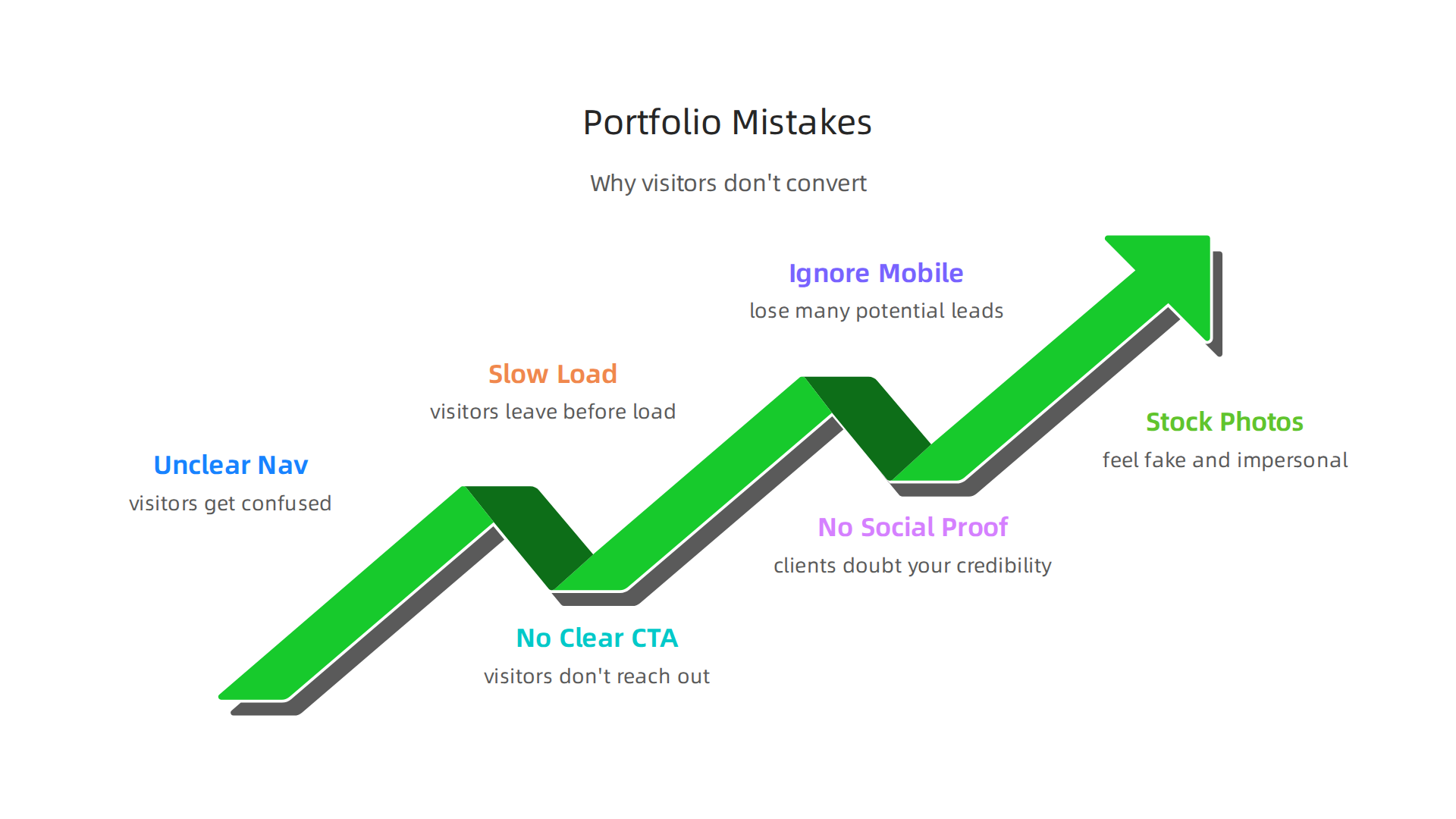
The main problem comes down to a few common mistakes. Here are the biggest ones that stop your site from bringing in clients.
Unclear or Confusing Navigation
When someone lands on your site, they should know exactly where to go in seconds. If your menu is cluttered or your labels are vague, visitors get confused. They bounce. Most people won’t hunt around to find your contact page or your services. They just leave.
Missing or Weak Calls to Action
A call to action (CTA) is your chance to tell visitors what to do next. But many portfolio sites skip this step. They show projects and hope people will figure out how to get in touch. That’s a big mistake. According to a list of website design mistakes that hurt conversion, a missing or unclear CTA is one of the top reasons sites fail to convert. You need a clear button or link that says "Book a call," "Get a quote," or "Let’s work together."
Slow Load Times
You have maybe three seconds to impress a visitor. If your site takes too long to load due to huge images or too many plugins, they’re gone. Speed matters big time, especially on mobile.
No Social Proof
Clients want to know you can deliver. If your site lacks testimonials, case studies, or client logos, it feels risky. People need proof before they reach out.
The good news is these problems are fixable. Start by auditing your site for these common leaks. Want a complete walkthrough? Check out our guide on building a UI UX designer portfolio that wins clients for a step-by-step approach.
Once you identify what’s broken, you can start fixing it. Let’s dive deeper into the design choices that hold your site back.
Essential Elements of a High-Converting Freelance Portfolio
Now that you know what’s broken, let’s talk about what actually works. The best freelance designer websites don’t just look good. They guide visitors step by step toward taking action.

Building that experience takes a few key ingredients.
Start With a Clear Value Proposition
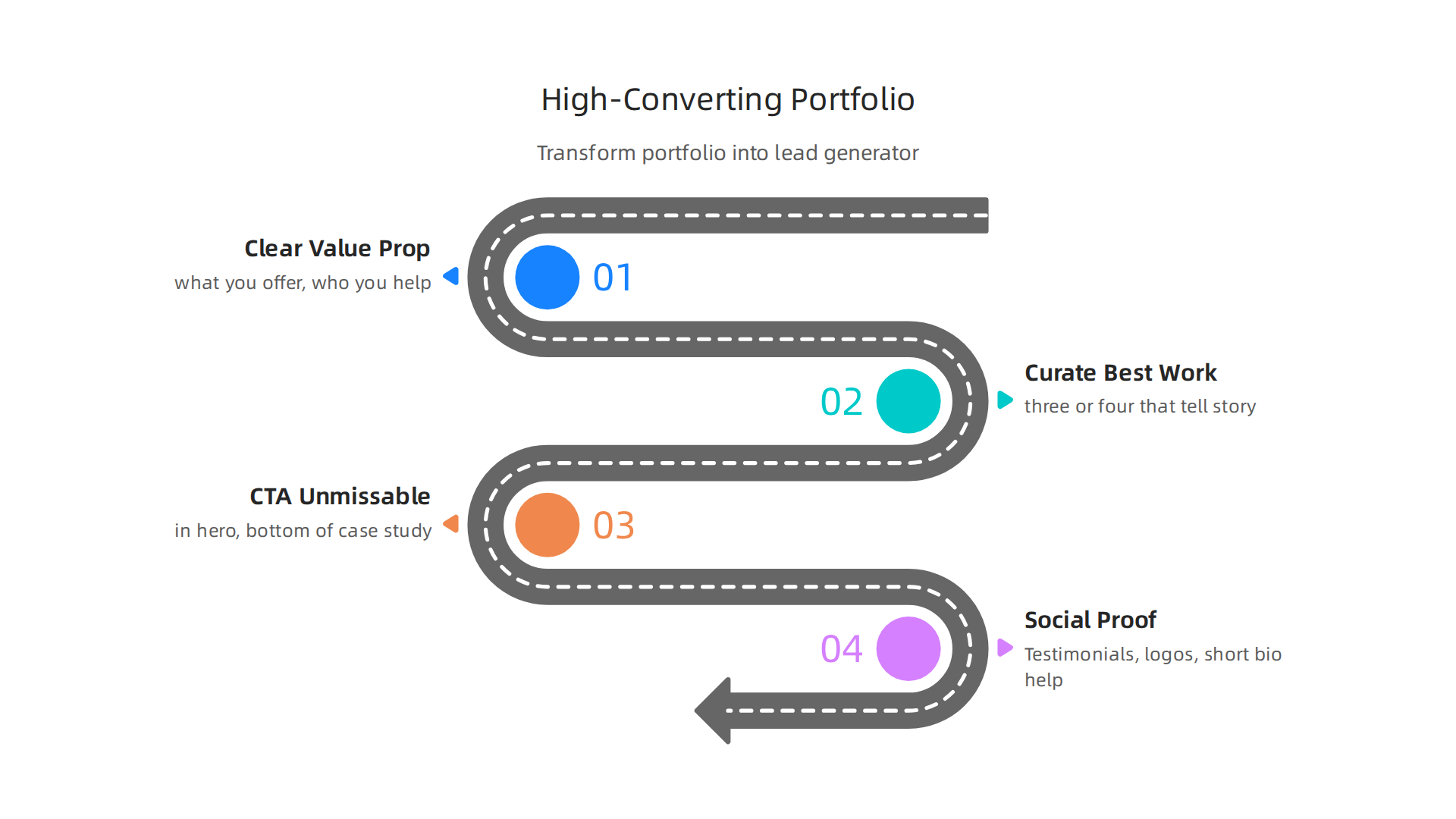
Within five seconds of landing on your site, someone should know exactly what you offer and who you help. Your hero section needs a strong headline that speaks to your ideal client’s biggest need. Something like "I help SaaS companies design interfaces that convert." Follow that with a short subheadline that adds a bit more detail. This clarity builds trust fast.
Curate Your Best Work With Case Studies
Here’s a hard truth. Most designers show too much work. You don’t need a dozen projects. You need three or four that tell a powerful story. Each case study should explain the challenge, your approach, and the results you achieved. Include real metrics when you can. Did your redesign boost sign ups by 30 percent? Say that. As one expert review notes, what tends to work in 2026 is fewer case studies that are tightly curated with fast load times and clear structure. Don’t include anything you aren’t proud of or that feels outdated.
Make Your CTA Impossible to Miss
You already know a missing CTA hurts conversions. But even a buried one does damage. Place your main call to action in the hero section, at the bottom of each case study, and again in your site footer. Use action words like "Book a free consult" or "Get your project quote." Make the button obvious and easy to click on mobile too.
Show Social Proof and Personality
Testimonials, client logos, and a short bio all help. People want to know you’re real and that you deliver. A quick blurb about your design style or communication approach goes a long way. For more ideas on building a portfolio that consistently brings in leads, take a look at these graphic design principles that turn your website into a lead generator.
Once you have these elements in place, your freelance design site will start working for you.
If you want help getting everything set up and optimized, you can sign up for a free trial of Weblish to get started.
Grow Your Traffic on Autopilot
How to Showcase Your Work Without Overwhelming Visitors
You have all these elements in place. Now comes the tricky part. How do you display your best projects without making visitors feel lost? The answer is simpler than you think.
Use a Clean Grid Layout With Filters
Think of your portfolio as a gallery, not a flea market. A clean, responsive grid lets people scan your work quickly. Add category filters like "Web Design," "Branding," or "UX Research." This way, a visitor can jump straight to what interests them. They explore at their own pace. No clutter. No confusion.
Limit What You Show
Here is a common mistake. Designers want to prove their range by showing everything. That approach backfires. Too many choices cause choice paralysis. People leave instead of deciding. Stick to three or four of your strongest pieces. Make every project count. As one expert guide on creating the perfect design portfolio puts it, clients look for just a few tightly curated projects. Cut anything that does not tell a clear story about your skills.
Always Include Context and Results
Never drop a picture onto the page without explaining it. Tell the reader what the challenge was, what you did, and how it helped the client. Did your web redesign cut bounce rates by 20 percent? Say that. Numbers build trust. A simple sentence next to each project makes your work feel real and credible.
Let the Layout Do the Work
Keep the design of your portfolio page minimal. White space is your friend. It lets each project breathe. Avoid busy backgrounds or animations that slow things down. Fast load times and a clear structure are what win in 2026.
For more ideas on building a portfolio that actually brings in leads, check out this guide on how to build a UI/UX designer portfolio that wins clients. It covers the same principles with extra detail.
Once you have your portfolio set up, you might want a tool that helps you manage leads and grow traffic without the headache. Get started with Weblish by signing up and claiming your free trial to see how it can keep your pipeline full.
The Role of SEO in Attracting Ideal Clients
You built a solid portfolio. Your work looks great. But none of that matters if no one finds it. That is where SEO comes in. Search engines are how potential clients discover freelance designer websites. If you do not optimize, you stay invisible.

And invisible freelancers do not get hired.
Target the Right Keywords
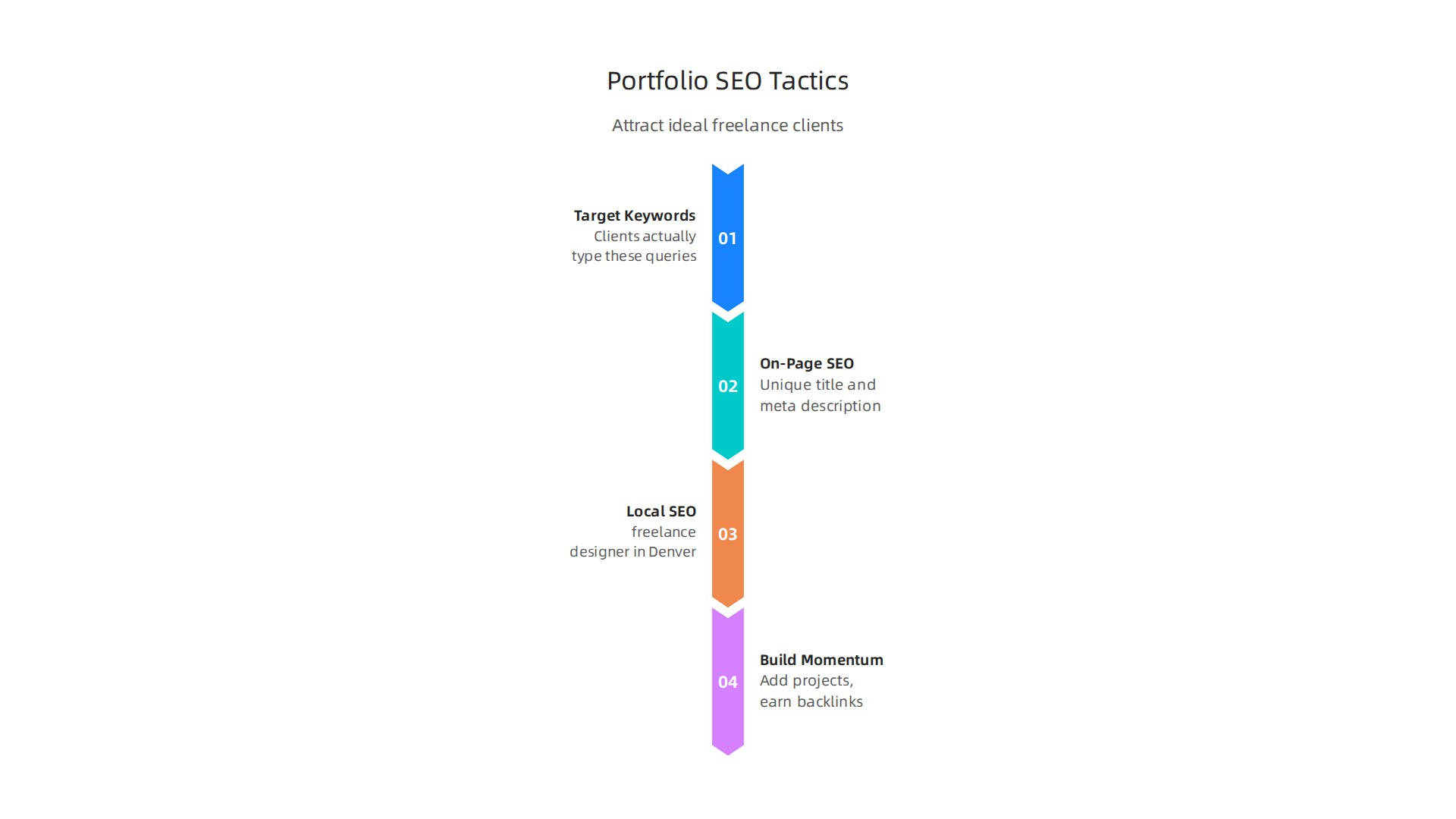
Start with keywords your ideal clients actually type into Google. If you are a freelance web developer in Austin, do not target "designer" alone. Target something like "freelance web developer Austin" or "freelance designer websites." These phrases have lower competition but high intent. Someone searching for them is ready to hire.
The 2026 Portfolio SEO Optimization Guide explains that you should place your main keyword in your page title, in the first 100 words of content, and naturally in project descriptions. Do not stuff keywords. Keep it natural. A density of 0.5 to 1.5 percent is plenty.
Master On-Page SEO
On-page SEO is the foundation. Every page on your portfolio site needs a unique title tag and a meta description that makes people want to click. Use header tags (H1, H2, H3) to structure your content. Google uses these to understand what your page is about. The 25 On-Page SEO Tips that WORK in 2026 handbook reminds us to write title tags for users first, then search engines. That same guide recommends using your primary keyword in the first 100 words, which we already covered.
Do not forget image alt text. Every project image should describe what the image shows and your design approach. This helps your images show up in Google Image search, bringing more eyes to your work.
Use Local SEO to Win Nearby Clients
If you serve clients in a specific city or region, local SEO is your secret weapon. Optimize for phrases like "freelance designer in Denver" or "freelance web developer Chicago." Make sure your name, address, and phone number appear consistently across the web. Claim your Google Business Profile. Add your portfolio URL to your LinkedIn, Instagram bio, and email signature.
A solid local SEO strategy helps you rank for searches like "[your service] freelancer [city]." For more tips on reaching nearby clients, check out this guide on why your small business needs a local SEO company.
Keep Building Momentum
SEO is not a one-time task. Keep adding new projects, writing case studies, and earning backlinks. Every new piece of content gives Google another reason to rank you higher. If you want to grow traffic without the guesswork, you can Grow Your Traffic on Autopilot with a done-for-you service that handles the heavy lifting.
Must-Have Website Features for Freelance Designers
Getting found through SEO is only half the battle. Once visitors land on your site, the experience you deliver decides whether they stay or leave. That is why certain features are non-negotiable for freelance designer websites.
Speed and Mobile Responsiveness
First, your site must load fast and look great on phones. According to the Portfolio Mistakes Designers Still Make in 2026 guide, fast load times and clear structure are what consistently work. If your site takes more than three seconds to load, you will lose more than half of your visitors. That is a fact. Compress your images, pick a lightweight template, and test your site on a mobile device before you send anyone to it. A smooth mobile experience tells clients you care about their time.
Contact Forms and Scheduling Tools
Next, make it easy for potential clients to reach you. A simple contact form on your contact page is fine, but adding a scheduling tool like Calendly takes away the back-and-forth email game. You can embed a booking link right on your site. The 7 Digital Portfolio Examples & Guide for 2026 from Squarespace suggests adding a booking page or contact form to let people request a quote easily. Do not make visitors hunt for your email. Put a contact link in your navigation and in your footer. Every extra click lowers the chance they will reach out.
Social Proof Elements
Finally, show that others trust you. Testimonials, logos of past clients, and case studies build instant credibility. When someone sees that you have worked with real companies, they feel safer hiring you. You do not need a whole page. A few short quotes on your homepage next to your best work goes a long way. For more ways to turn your site into a client-getting machine, check out this guide on how to convert visitors to customers. It covers simple tweaks that boost trust and action.
If you want a professional portfolio that includes all these features without the guesswork, you can get started with Weblish by signing up and claiming your free trial. Their team handles design, speed, and conversion so you can focus on your craft.
Leveraging Social Proof and Testimonials
You can have the most beautiful portfolio on the internet. But if a visitor sees no signs that other people trust you, they will hesitate. Social proof is the fastest way to turn that hesitation into action.
Here is what works best for freelance designer websites in 2026.
Video Testimonials Are Worth the Effort
A simple written quote is nice. A video testimonial is gold. Research shows that video testimonials can increase conversion rates by up to 80%. When a real person looks into the camera and says you delivered on time and exceeded expectations, that trust is hard to fake.

Ask a past client to record a 30-second clip. Put it on your services page or next to your call-to-action button.
Client Logos and Recognition Badges
Displaying logos of companies you have worked with tells visitors instantly that you are not new to this. It is a visual shortcut to credibility. If you have won awards or earned certifications, show those badges too. The key is to place them where people are about to make a decision, like near your contact form or booking link. Strategic placement of social proof elements directly near CTAs can significantly improve how many visitors reach out.
Case Studies That Show Real Results
A case study is like a long-form testimonial. Walk through a project from start to finish. Show the problem, your solution, and the outcome with numbers if possible. Concrete results like increased website traffic or higher sales are more convincing than vague praise. Case studies build deep trust with serious clients who want to see proof of your skills.
To learn more about turning your website into a lead-generating machine, check out this guide on small business website conversion strategies. It covers practical ways to optimize every page for action.
Make It Easy to Get Started
If you want to implement all these trust builders without worrying about the technical setup, you can Connect your website with Weblish and grow your traffic on autopilot with AI. Their team handles the design, speed, and social proof elements so you can focus on your projects.
Common Mistakes and How to Avoid Them
Now that you know how to build trust with social proof, let’s look at some mistakes that could undo all that hard work. Even the best freelance designer websites lose visitors when they fall into these common traps. Here are the biggest ones and how to fix them.
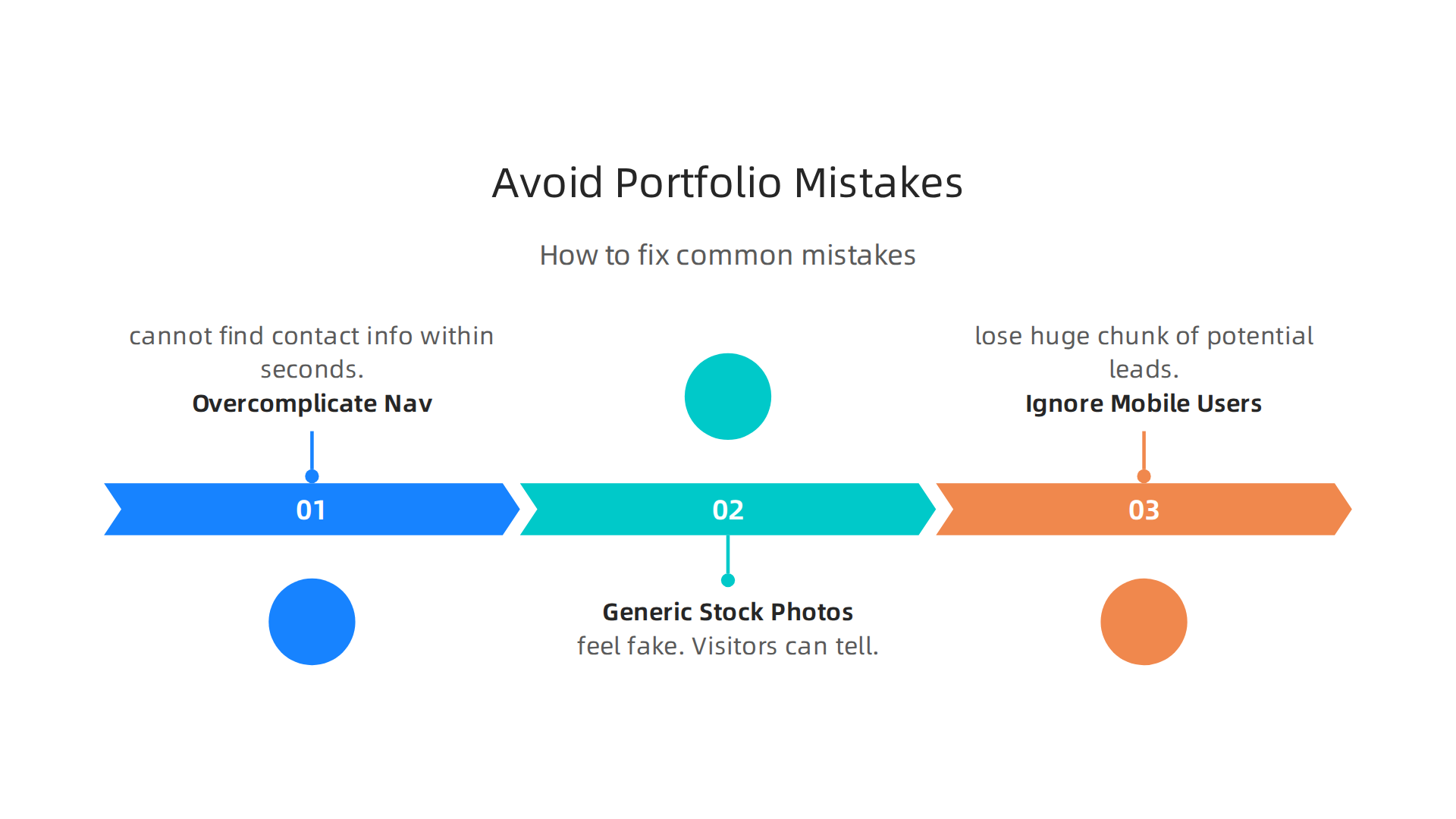
Mistake 1: Overcomplicating Navigation and Hiding Your Contact Info
You want your site to look creative. But if a visitor cannot find your phone number, email, or a contact form within seconds, they will leave. Too many menu items, fancy dropdowns, or links that blend into the background hurt your chances.
Keep your navigation simple. Limit main menu items to five or six at most. Place your contact information in the header and footer on every page. If someone has to hunt for how to reach you, they will move on to one of the many other best freelance websites out there.
Mistake 2: Using Generic Stock Photos Instead of Your Own Work
Stock photos of people shaking hands or typing on laptops feel fake. Visitors can tell. Your portfolio should show real projects you designed. Even if you are a freelance web developer just starting out, use screenshots, mockups, or photos of your actual work.
Authenticity builds trust. When people visit freelance designer sites, they want to see your style and skill. A generic stock photo tells them nothing about what you can do. Show your real stuff.
Mistake 3: Ignoring Mobile Users
Here is a hard truth. Most of your traffic will come from phones. In 2026, websites that are not optimized for mobile lose a huge chunk of potential leads. According to recent web design data, responsive websites see about 11% higher conversion rates. That means a site that works well on a small screen turns more visitors into clients.
Check your portfolio website design on a phone. Are the buttons easy to tap? Is the text readable without zooming? If not, you are sending people away.
How to fix these problems without spending weeks redoing your site? A professional team can handle it for you. You can sign up for a free trial of Weblish and let their experts build a clean, mobile-friendly site that avoids all these mistakes. They take care of navigation, custom imagery, and every detail so you can focus on your projects.
If you want to dig deeper into making your site work better, read this guide on common website experience problems in 2026. It covers more pitfalls and simple wins you can apply today.
Summary
This article shows freelance designers how to turn a pretty portfolio into a reliable client-generating website. It explains common reasons portfolios fail—unclear navigation, weak CTAs, slow load times, and lack of social proof—and gives concrete fixes you can apply immediately. You’ll learn how to craft a five-second value proposition, curate three to four powerful case studies with measurable results, and design obvious CTAs and mobile-friendly layouts that guide visitors to book a call. The guide also covers practical SEO steps to help ideal clients find you, essential site features like scheduling tools and fast images, and how to use testimonials and logos to build trust. Finally, it points out frequent mistakes to avoid and explains when a service like Weblish can save you time by handling optimization and conversions for you.