
Drive Business Growth with the Right SEO Audit Tools
This guide explains why SEO audits are essential for small and mid-sized businesses whose websites often act like static brochures instead of lead generators. I…


Why SEO Audits Matter for Small & Mid-Sized Businesses (and What This Guide Covers)
In 2026, many small and mid-sized businesses have websites that are like fancy brochures. They look nice, but they don’t actually bring in new customers or leads. It’s a big problem when your website just sits there, instead of working hard for you. This often happens because hidden issues stop search engines like Google from showing your website to the right people.
An SEO audit is like a health check for your website. It looks at everything to find what’s broken or what could be better. This includes checking if your site is easy for search engines to understand, if it loads fast, and if your content helps people find what they need. A good audit will find these gaps and show you how to fix them so your website can start bringing in more business. According to a 2026 dataset, many sites still struggle with basic technical issues that an audit can reveal 2026 Technical SEO Audit Dataset | Matcha Growth.
When you do an SEO audit, you’re looking at things like your website’s structure, the words you use, and even how fast pages load. It covers technical parts, your website content, and how easy it is for visitors to use, as explained in a 2026 guide SEO Audit Guide 2026: Complete Walkthrough. The goal is to turn your "brochure site" into a lead-generating machine. Many small seo tools can help with this process by checking different parts of your site, from speed to the words on your pages.
This guide will help you understand how to use different seo audit tools to make your website better. You will learn about:
- Different types of seo audit tools: From simple tools to more advanced seo studio tools.
- When to do it yourself or hire help: Knowing when you can fix things on your own and when it’s best to get an expert.
- How to decide what to fix first: Not all problems are equal. We’ll show you how to focus on what matters most for growth.
- How to know if your fixes worked: Simple ways to measure if your efforts are paying off.
By the end, you’ll have a clear path to make your website work harder for your business, helping with tasks like seo content optimization and boosting traffic. If you’re ready to improve your website’s performance and turn visitors into consistent leads, it’s time to dig into the world of SEO audits.
Connect your website with Weblish and Grow Your Traffic on Autopilot with AI.
What SEO Audit Tools Do — and Why SMBs Need Them
SEO audit tools are like special detectors that check your website from top to bottom. They help you find out why your website might not be showing up in search results or bringing in new customers. For small and mid-sized businesses (SMBs), using these tools is a smart way to make your website truly work for you, instead of just sitting there. They help turn your online presence into a lead-generating machine.
Here’s what good seo audit tools typically look for:
How Search Engines Find Your Site (Crawling and Indexing)
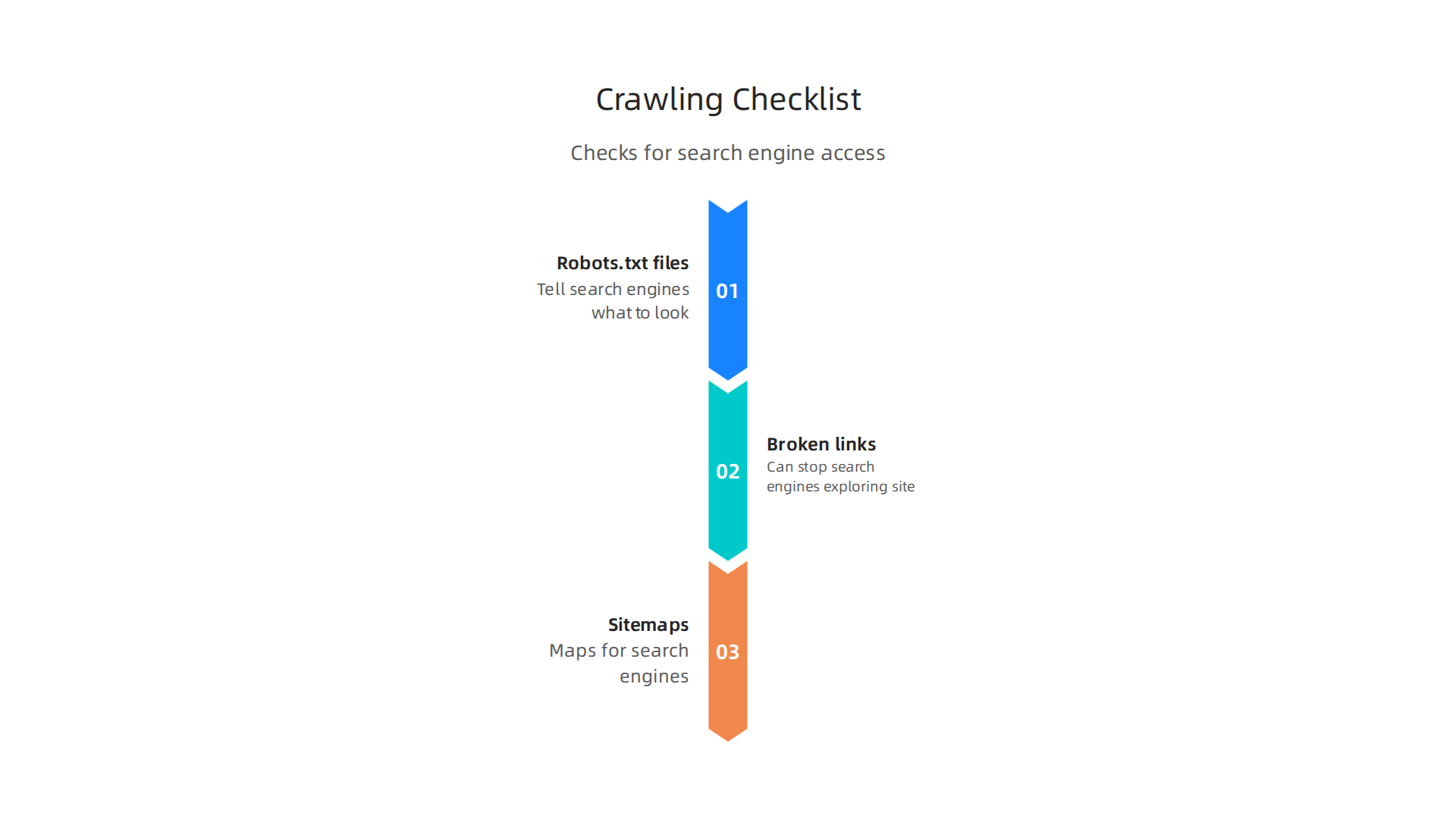
First, seo audit tools check if search engines like Google can easily find and understand your website’s pages. This is called "crawling" and "indexing." If search engines can’t crawl your site properly, your pages won’t show up in results at all. Tools look for things like:
- Robots.txt files: These tell search engines which parts of your site they can or cannot look at.
- Broken links: Links that go nowhere can stop search engines from exploring your site fully.
- Sitemaps: These are like maps for search engines, guiding them to all your important pages.
Making sure your site is crawlable and indexable is a key first step for any business, as highlighted in a 2026 SEO audit checklist, especially with new AI considerations SEO Audit Checklist 2026: Master AI Technical SEO.
Technical Website Issues
Next, seo audit tools dive into the technical parts of your website. These are things that users usually don’t see but greatly affect how well your site performs.
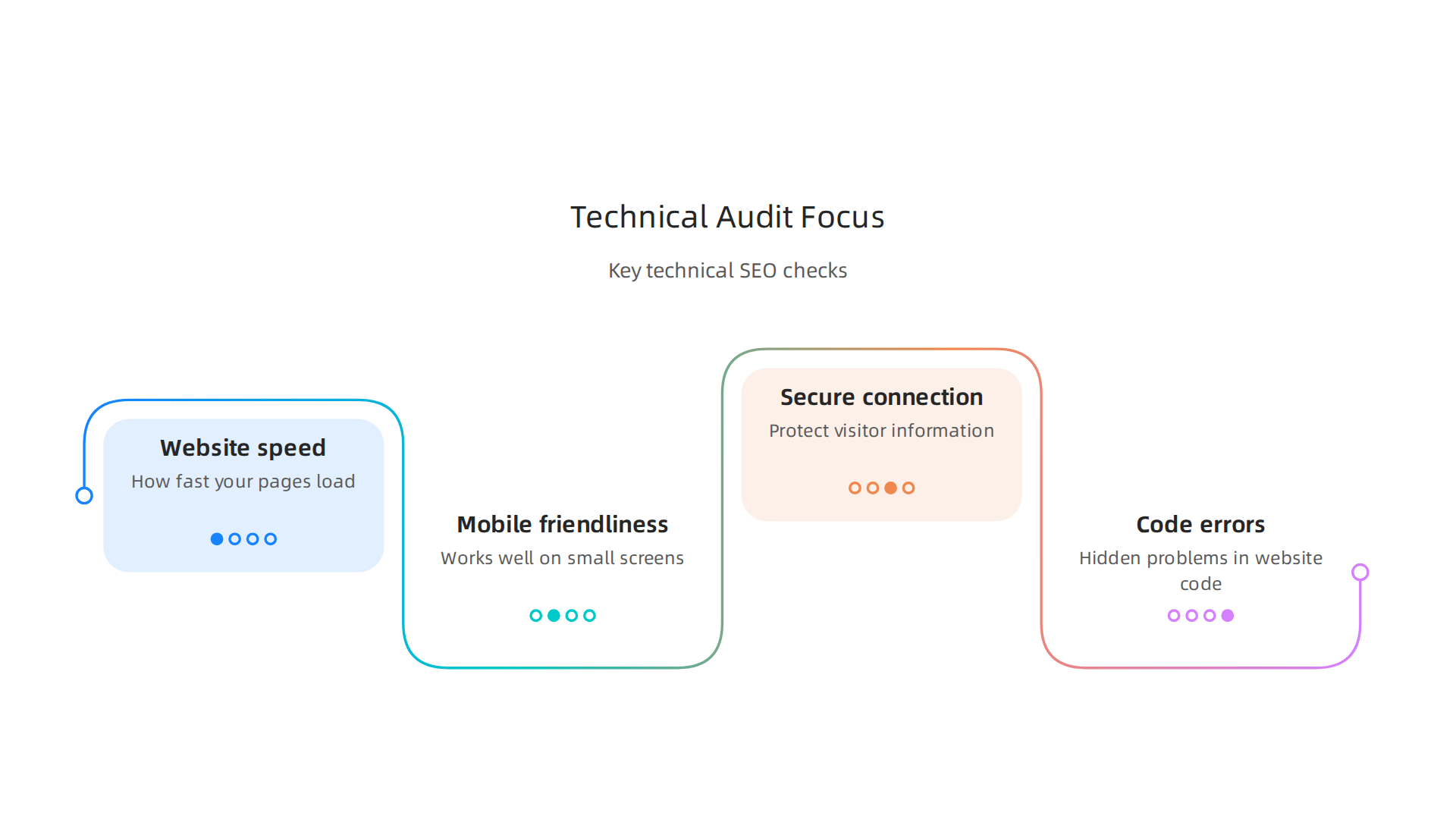
Fixing these can make a big difference for your visitors and for search engines. This includes:
- Website speed: How fast your pages load is super important. Slow sites make people leave.
- Mobile-friendliness: Most people use phones to browse the internet, so your site must look and work well on small screens.
- Secure connection (HTTPS): Your website needs to be secure to protect visitor information, shown by "HTTPS" in the address bar.
- Broken codes or errors: Tools find hidden problems in your website’s code that can mess things up.
These technical aspects are crucial for your website’s health, helping it perform well for both people and search engines.
Website Content and Keywords
Seo audit tools also examine your website’s content. This means looking at the words you use, how you use them, and if they match what your potential customers are searching for. This part of the audit focuses on seo content optimization.
- Keywords: Are you using the right words that people type into search engines?
- Content quality: Is your content helpful, clear, and easy to read?
- Duplicate content: Do you have the same text on many pages, which can confuse search engines?
- Page titles and descriptions: These are the headlines and small summaries that show up in search results. Are they engaging?
Good small seo tools can quickly spot these issues and help you make your content more appealing to both readers and search engines.
Links from Other Websites (Backlinks)
Another important part is checking "backlinks." These are links from other websites that point to your site. Think of them as votes of confidence. The more good quality backlinks you have, the more important search engines see your website as. Seo audit tools help:
- Find good backlinks: Identify strong, trustworthy websites linking to you.
- Spot bad backlinks: Find harmful links from spammy sites that could hurt your ranking.
- Check competitors’ links: See who links to your rivals to find new chances for your own site.
User Experience (UX) Signals
Lastly, seo audit tools help look at how people actually use your website. This is called User Experience or UX. A good UX means visitors can easily find what they need and have a pleasant time on your site. When your site is easy to use, people stay longer and are more likely to become customers. This ties directly into making your website a lead generation machine, as a positive user experience can dramatically transform visitors into customers, a key aspect when you designing UX for trust transforms website visitors into customers.
- Easy navigation: Can visitors quickly find products, services, or contact info?
- Engagement: Do people spend time on your pages, or do they leave right away?
- Conversion paths: Is it clear how a visitor can take the next step, like filling out a form or making a purchase?
Tying Audits to Business Goals
For SMBs, all these checks by seo audit tools are not just technical tasks. They directly connect to your business goals. A comprehensive audit helps you:
- Capture more leads: By fixing technical issues and improving content, more potential customers can find your site and get in touch.
- Increase conversion rates: When your website is fast, easy to use, and has great content, more visitors will become paying customers.
- Grow traffic for the long run: By understanding and acting on audit findings, you build a stronger online presence that attracts steady visitors over time.
In 2026, using seo studio tools and other affordable options is a must for any SMB looking to make their website a core part of their growth strategy How to Conduct an SEO Audit Complete Guide for SMEs …. It’s about building a solid foundation so your website can consistently bring in new business, helping you to how to build a lead generating website for small business growth and thrive.
Now that you know what SEO audit tools look for, let’s talk about the different kinds you can use.
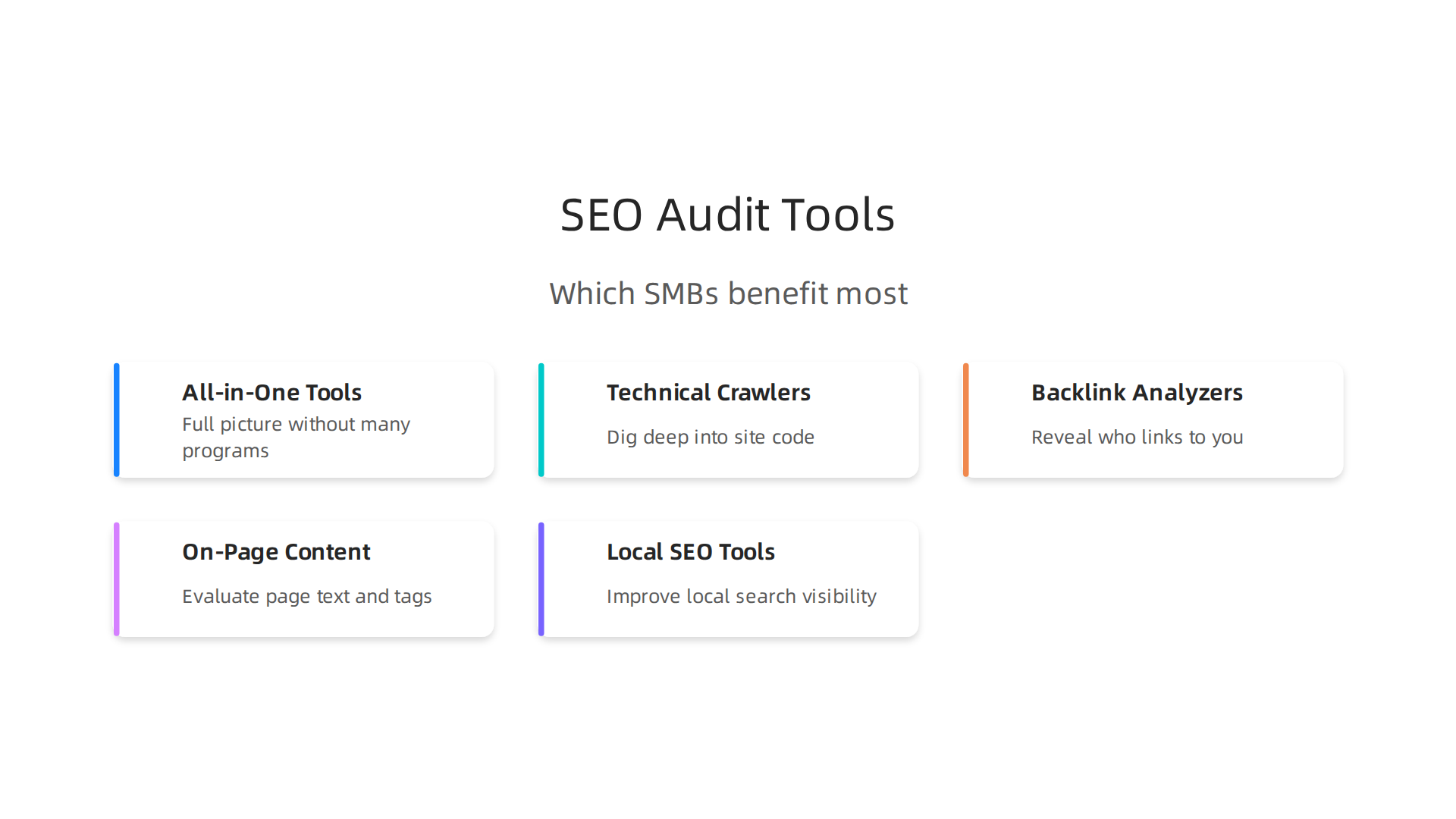
Just like you might choose different tools for different jobs around your house, there are various types of seo audit tools for different website needs. Picking the right one often depends on what your small or mid-sized business (SMB) needs most and how much you want to spend.
All-in-One SEO Studio Tools
Think of these as the big toolboxes. All-in-one seo studio tools give you a little bit of everything. They check your website’s health, look at keywords, peek at what your rivals are doing, and even help with finding links from other websites. These tools are great for businesses that want a full picture without having to use many different programs. Many of the best SEO audit tools in 2026 fall into this category, offering a wide range of features from full site crawling to backlink monitoring, as discussed in one comparison of Top Website Audit Tools for SEO in 2026.
- Who benefits most: SMBs that are serious about growing online and want a complete view of their SEO health. If you’re looking to manage your own SEO or have a small marketing team, an all-in-one tool can be a smart choice. These are also good for businesses ready to invest a bit more for a wider range of features.
Technical Website Crawlers
These tools are like a detective for your website’s hidden parts. Technical crawlers dig deep into your website’s code and structure. They find problems like slow-loading pages, broken links, or issues that stop search engines from seeing your content properly. They’re super important for making sure your website runs smoothly. In 2026, many experts highlight the importance of dedicated technical tools, including some free options, for in-depth audits, as seen in various lists of Best Free Website Audit Tools In 2026.
- Who benefits most: Any SMB, but especially those with large websites, many products, or businesses that have recently changed their website design. If your website is slow or has tricky parts, a technical crawler can help you fix the basics.
Backlink Analyzers
These tools focus on "backlinks," which are links from other websites that point to your site. Backlinks are like votes of trust. Backlink analyzers help you see who is linking to you, if those links are good quality, and even what links your competitors have. This helps you build more trust with search engines.
- Who benefits most: Businesses in competitive fields or those looking to become leaders in their niche. If you want to build your website’s authority and get more recognition, a backlink analyzer can show you the way. You can also explore link building services for small business owners if you need help getting quality links.
On-Page Content Checkers
These small seo tools look at the words on your website pages. They help you figure out if you’re using the right keywords, if your writing is easy to understand, and if you’re missing out on chances to talk about important topics. Good seo content optimization means your website speaks clearly to both people and search engines.
- Who benefits most: Every SMB can benefit from these, but they are especially useful for content-heavy businesses like blogs, online shops with many product descriptions, or service providers explaining their offerings. If you want your website to truly explain what you do and attract the right people, these tools are key.
Local SEO Tools
For businesses that serve customers in a specific area, local SEO tools are a must. They help you show up in local search results, like when someone searches for "plumber near me." These tools check your Google Business Profile, make sure your address and phone number are correct everywhere online, and help you get reviews. Getting found by local customers is vital for many businesses, and a local SEO company in 2026 can help you get started.
- Who benefits most: Brick-and-mortar stores, restaurants, local service providers (like electricians or hairdressers), and any business that relies on customers visiting a physical location or needing local service.
Choosing the right mix of seo audit tools depends on your specific business goals and how much time and money you can put into SEO.

Some businesses might start with free options like Google Search Console before moving to more advanced paid tools. The goal is always to make your website work harder for you.
Want to learn how a smart online presence can help your business grow? Weblish is here to help transform your website into a lead-generating machine.
Grow your traffic on autopilot with AI. Grow Your Traffic on Autopilot
When you’re looking at different SEO audit tools, it’s like shopping for a new appliance for your home. You don’t just pick the first one you see. You need to think about what it does, how well it works, and if it’s easy for you to use. This way, you make sure the tool truly helps your business grow online.
How to Evaluate & Choose an SEO Audit Tool (Features, Data, and Usability)
To pick the best SEO audit tools for your small or mid-sized business (SMB), you need a clear way to compare them. Here’s what to look for:
1. What Features Does It Have?
Good SEO audit tools should offer many helpful features. Think about what was mentioned before, like checking your whole website, looking at keywords, or seeing what your competitors are doing. Some top tools in 2026 have features like full site crawling, finding broken links, and checking for duplicate content problems. They also help with things like fixing important tags on your pages and making sure your website is set up right for search engines to understand it. You can often find a mix of these features in various types of SEO audit software and best tools for 2026.
- For SMBs, consider: Do you need an "all-in-one seo studio tool" that covers everything, or just specific "small seo tools" for certain tasks like improving your content? If "seo content optimization" is your main goal, make sure the tool deeply analyzes your text and keyword use.
2. How Good is the Data?
The information you get from an SEO audit tool needs to be fresh and correct. Old or wrong data won’t help you make smart choices for your website. Ask yourself:
- Does the tool update its information often?
- Does it get its data from reliable places?
- Can you trust the scores and warnings it gives you?
3. Is It Easy to Use?
You don’t want to spend all your time trying to figure out a complicated tool. The best SEO audit tools are easy to understand, even if you’re not an SEO expert.
- Simple design: Does the tool have a clear layout?
- Easy reports: Are the reports simple to read and share?
- Good help: Is there good customer support or easy-to-follow guides if you get stuck?
4. Can It Work with Other Tools?
Sometimes, you use other internet marketing tools for your business. It’s great if your SEO audit tool can connect with them. For example, if it can link up with Google Analytics or Google Search Console, you get a much fuller picture of your website’s performance. Having internet marketing tools that save time and cut costs for small businesses working together makes your job much easier.
5. Does It Give Clear Advice?
A tool that just tells you what’s wrong isn’t enough. The best ones also tell you how to fix it. Look for tools that give you clear, step-by-step suggestions you can act on. This makes sure you can actually use the audit to improve your website.
A Checklist for Choosing Your SEO Audit Tool
When you’re ready to pick, here’s a simple checklist:
- What are your must-have features? List the things your business absolutely needs the tool to do. Do you need a deep dive into technical issues, or mostly help with "seo content optimization"?
- What are nice-to-have features? These are extra things that would be good but aren’t deal-breakers.
- How much can you spend? Free tools like Google Search Console are a great start, but paid tools often give more detail and features. A basic professional SEO audit for a small business can range from $500 to $2,500 in 2026, while comprehensive options can go up to $5,000 or more depending on complexity and scope. Many compare the cost of an SEO audit in 2026 before committing to a tool or service.
- Can you try it first? Many paid SEO audit tools offer free trials or free versions with limited features. This lets you test the tool to see if it fits your needs and if it’s easy for you to use.
- Does it fit your business size? Some "seo studio tools" are built for very large companies, while others are perfect for SMBs. Make sure it’s a good match for your website’s size and your team’s skills.
By carefully evaluating these points, you can choose SEO audit tools that truly help your small or mid-sized business get found online and attract more customers.
Choosing the right SEO audit tools and knowing what to look for is a great start. But a big question many small and mid-sized businesses (SMBs) ask is: "Should I do this myself with tools, or should I hire someone to do it for me?" Let’s look at when to go the do-it-yourself (DIY) route and when it’s better to bring in an expert.
DIY Audit vs. Professional Audit Services: When to Hire an Expert
Doing your own SEO audit with tools can be very rewarding. It saves money, and you learn a lot about your website. However, there are times when a professional’s help is truly needed.
Doing Your Own SEO Audit (DIY)
Pros (Good Points):
- Lower Cost: You only pay for the SEO audit tools or use free ones like Google Search Console. This saves money compared to hiring an agency.
- Learning Curve: You get to learn how SEO works and understand your website’s health better. This knowledge can help you make smart choices in the future.
- Quick Checks: For basic issues, running a quick scan with "small seo tools" can give you fast answers and easy fixes.
- Full Control: You decide what to look at and when to do it.
Cons (Bad Points):
- Time Consuming: Learning to use complex "seo audit tools" and then fixing issues takes a lot of time. If you’re busy running your business, this might be hard.
- Limited Knowledge: SEO has many moving parts, like technical SEO, content strategy, and backlinks. Without deep knowledge, you might miss big problems or not know the best way to fix them.
- Overwhelm: The amount of data and issues an audit uncovers can be too much to handle if you’re not an expert.
- Lack of Depth: While you can do some "seo content optimization" with tools, a professional can see the bigger picture and offer deeper insights.
Hiring a Professional SEO Audit Service
When you hire an SEO expert or agency, you’re paying for their special skills and experience. They use advanced "seo studio tools" and know how to find and fix issues that you might overlook.
Pros (Good Points):
- Expert Knowledge: Professionals understand all the details of SEO. They can spot hidden problems and know the best ways to fix them.
- Deeper Analysis: Experts go beyond what basic tools show. They look at your website’s code, how it works, your content, and what your competitors are doing in great detail.
- Time Saving: An expert can do the audit much faster and more thoroughly, freeing up your time to focus on your business.
- Clear Action Plan: They don’t just tell you what’s wrong. They give you a step-by-step plan for what to fix first to get the best results.
- Ongoing Support: Many agencies offer continued help, making sure your website stays healthy and keeps growing.
Cons (Bad Points):
- Higher Cost: Hiring an expert or agency costs more than doing it yourself. In 2026, a professional SEO audit for a small business can range from about $500 to $2,500, while a more in-depth service might be $750 to $2,500 or more, depending on your site’s size and needs How Much Does an SEO Audit Cost in 2026? Real Pricing …. For ongoing help, some small businesses pay around $2,500 to $5,000 per month for complete SEO services SEO Pricing 2026: What SEO Services Cost by Agency.
- Finding the Right Expert: You need to do research to find a trustworthy and skilled professional who truly understands your business.
When Should an SMB Hire an Expert?
Deciding when to hire an SEO expert comes down to a few key signals:

- You’re Not Seeing Results: If you’ve tried DIY SEO and your website still isn’t getting more visitors or showing up higher in search results, it’s a clear sign you need outside help.
- Your Website is Complex: If you have a large website with many pages, an e-commerce store, or special features, a DIY audit might not be enough. These sites often have tricky technical issues that need an expert’s eye.
- You Don’t Have Time or Expertise: If you’re too busy with other parts of your business, or you just don’t feel confident about doing a thorough SEO audit, a professional can take that burden off your shoulders.
- You Need a Clear Strategy: An expert won’t just tell you what to fix but will also help you create a long-term plan for how your website can grow.
- Your Competitors are Winning: If your rivals are outranking you, an expert can perform a deeper competitive analysis to find out why and create a plan to help you catch up. This is often why many small businesses opt to work with an SEO consultant, as explored in why your small business needs an SEO consultant in 2026.
Making the choice between DIY and hiring an expert depends on your budget, time, and how much growth you want to see. For many SMBs, a mix of using free tools for basic checks and bringing in a professional for deep dives and ongoing strategy works best.
If you’re looking to consistently improve your website’s performance and attract more customers without the stress of managing complex SEO yourself, a done-for-you service might be the answer.
Ready to take your website to the next level? Grow Your Traffic on Autopilot.
Once you have your SEO audit findings, whether from your own work with seo audit tools or from a professional, the next big step is to act on them. It’s not enough to know what’s wrong; you need to fix it. But where do you start? For small and mid-sized businesses (SMBs) with limited time and money, deciding what to tackle first is very important.
Implementing Audit Findings: Prioritization, Common Fixes, and Workflows
Imagine your SEO audit is a doctor’s report for your website. It tells you everything that needs attention. You wouldn’t try to fix everything at once, especially if some things are more urgent or easier to fix than others. This is where prioritization comes in.
How to Prioritize Your SEO Fixes
The best way to decide what to fix first is to use a simple idea called the Impact vs. Effort framework.
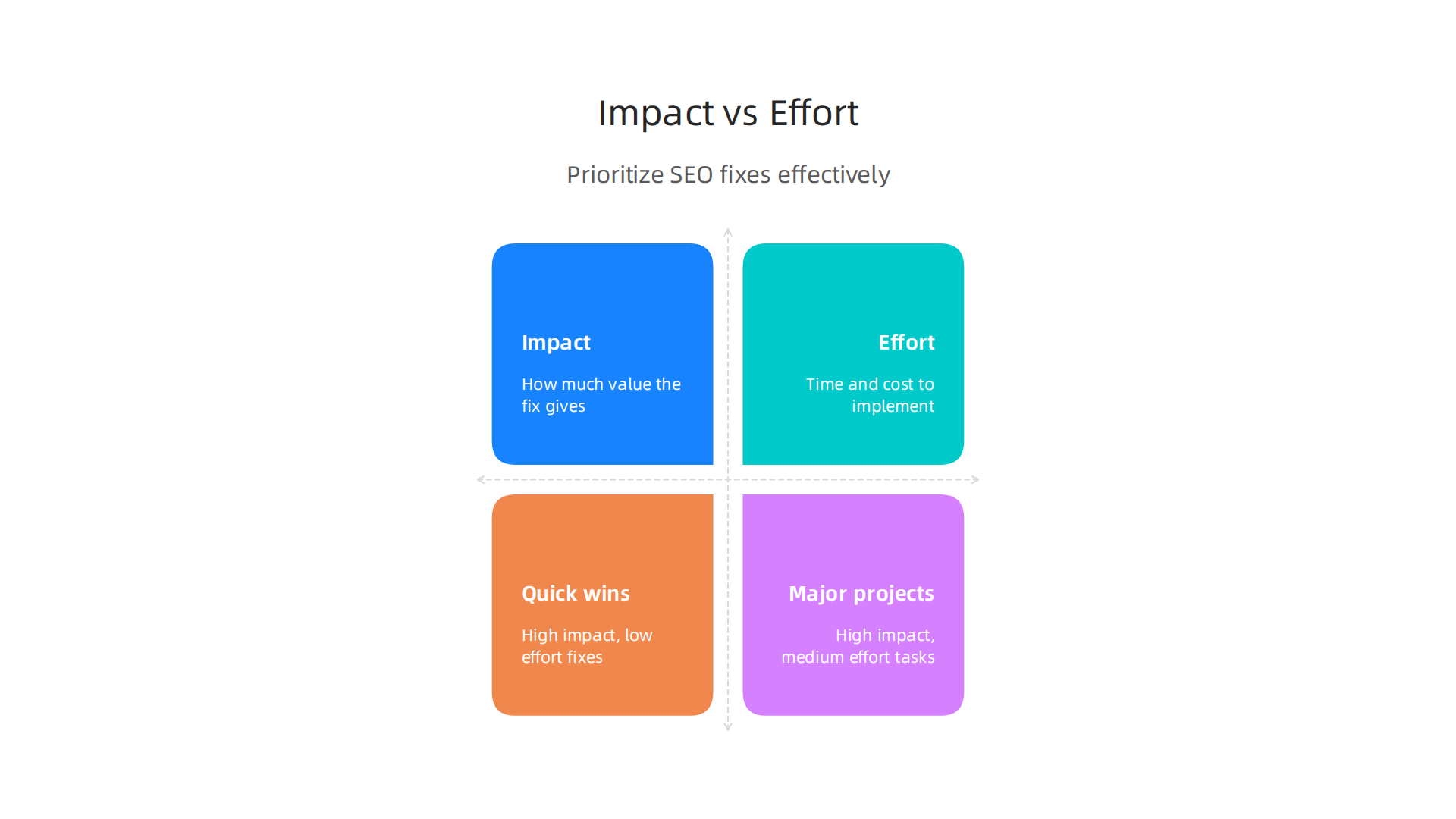
This helps you choose tasks that will give you the most "bang for your buck."
- Impact: How much will fixing this problem really help your business? Think about things like:
- Will it bring more visitors to your site?
- Will it help you get more calls or sales?
- Will it make your website show up higher in search results for important keywords?
- Focus on actual business outcomes, not just technical details. A fix that affects your main money-making pages has a higher impact than one on a less important page.
- Effort: How hard or costly will it be to fix this problem? Think about:
- How much time will it take?
- Will you need special skills or tools?
- Will you need to pay someone to do it?
You can score each problem on a simple scale, like 1 to 5, for both impact and effort. Then, focus on the issues that have a high impact but require low effort. These are your "quick wins." After that, move to high impact, medium effort tasks. Leave the low impact, high effort tasks for later, or perhaps even decide not to do them if resources are tight. This way of thinking helps SMBs with limited resources make smart choices about their SEO. Many experts agree that this kind of impact-effort matrix is a useful tool for deciding what to do next to improve SEO performance and marketing efforts in general, especially when you have many tasks to juggle Impact Effort Matrix: What It Is, How to Use It, and Examples and Impact-effort matrix: How to make better marketing ….
Common SEO Fixes You’ll Likely See
Many SEO audits point out similar problems. Here are some common ones and why they matter:
- Site Speed: Does your website load quickly? If it’s slow, people will leave, and search engines like Google might rank you lower. Simple
small seo toolscan help you check your site speed. - Structured Data: This is special code that helps search engines understand what your content is about. For example, if you have a recipe, structured data can tell Google it’s a recipe, which can help it show up better in search results with pictures or ratings.
- Meta Tags: These are small pieces of information in your website’s code that describe what a page is about. They include your title tag (the text you see in the browser tab) and meta description (the short summary under your link in search results). Making these clear and keyword-rich is part of
seo content optimization. - Internal Linking: This means linking from one page on your website to another. Good internal linking helps search engines find all your pages and helps visitors navigate your site easily. It also shows which pages are most important.
- Broken Links: If you have links on your site that go nowhere, it’s a bad experience for users and looks bad to search engines. Fixing these is usually a quick win.
- Duplicate Content: Having the exact same content on multiple pages can confuse search engines about which page to show. Using
seo studio toolscan help you find these issues.
How to Implement Your SEO Fixes (Workflow)
Once you know what to fix and in what order, you need a plan. Here’s a simple workflow:
- List Everything: Create a clear list of all the issues found in your audit.
- Prioritize: Use the Impact vs. Effort framework to sort your list. Focus on high impact, low effort tasks first.
- Assign Owners: Decide who will fix each item. For an SMB, this might be you, a team member, or your hired SEO expert. Make sure everyone knows what they need to do.
- Set Deadlines: Give each task a realistic due date.
- Track Progress: Keep an eye on how the fixes are going. You can use a simple spreadsheet or project management tool. Remember, fixing SEO issues is not a one-time thing. It’s an ongoing process.
- Measure Results: After you’ve made changes, check if they are working. Are you getting more traffic? Are your keywords ranking higher? Tools like Google Search Console and Google Analytics can help you measure your SEO success. Measuring results and understanding your website’s performance is key to knowing if your efforts are paying off, as discussed in SEO KPIs to Track in 2026: 16 Metrics That Actually Drive ….
A great website is crucial for generating leads, and consistent improvements from an SEO audit can help a lot. If you’re looking for more ways to make your website work harder for your business, exploring strategies for how to build a lead generating website for small business growth can offer valuable insights.
By following this method, even SMBs can make big improvements to their online presence without feeling overwhelmed. It’s all about smart steps and staying focused on what truly helps your business grow.
Now that you have made your SEO fixes, the next step is to make sure they are actually working. You need to keep an eye on certain numbers to see if your efforts are paying off. This is how you measure the true impact of your SEO work and show that the time and money you spent were worth it.
Measuring Impact: KPIs, Reporting, and Calculating ROI from SEO Audits
To really know if your SEO audit fixes are helping, you need to track Key Performance Indicators (KPIs). Think of KPIs as your website’s report card. They show you how well your website is doing in important areas.
What Are Key Performance Indicators (KPIs) for SEO?
KPIs help you understand if your website is bringing in more visitors, making more sales, and showing up higher in search results. Here are the main KPIs you should watch after an SEO audit:
- Organic Traffic: This is the number of people who find your website by searching on Google or other search engines and clicking on your link. When you make SEO improvements, you want this number to go up. It shows more people are discovering your business naturally. Many experts agree that organic traffic is a top KPI to track for success The Most Important SEO KPIs to Track for Enterprises.
- Leads from Organic Search: It’s great to have more visitors, but what if they don’t do anything? This KPI tells you how many visitors from search engines actually become leads, like filling out a contact form, signing up for a newsletter, or making a call. This is often called "organic conversions."
- Rankings for Target Keywords: These show where your website appears in search results for the important words and phrases people type into search engines. If you’re fixing your
seo content optimization, you expect your rankings for these keywords to improve. - Page-Level Conversion Rates: This measures how many people complete a desired action on a specific page. For example, if 100 people visit your product page, and 5 of them buy something, your conversion rate for that page is 5%. Improving slow pages or bad content can boost these rates.
You can check these numbers using tools like Google Analytics and Google Search Console. These tools help you collect data over time to see trends. To get a good picture, many recommend collecting at least 12 months of data from these tools to avoid seasonal ups and downs in your results How to Conduct an SEO Audit Complete Guide for SMEs 2026. You can even learn how to use the Google Search Console API to automate your SEO reports for easier tracking.
Reporting Your SEO Progress
You should look at your KPIs regularly. For many small and mid-sized businesses (SMBs), checking them once a month or every three months works well. This helps you see how things are changing and if your fixes are having an impact.
When you report your progress, don’t just share numbers. Explain what those numbers mean for your business. For example:
- "Organic traffic went up by 15% this month, which means 100 more people found us through search."
- "We got 5 new leads from organic search, leading to 2 new sales."
Being clear helps everyone understand the value of your SEO work. For more ways to improve your website’s ability to turn visitors into customers, consider these small business website conversion tips.
Calculating Return on Investment (ROI) from SEO Audits
ROI means "Return on Investment." It tells you if the money and time you put into your SEO audit and fixes are bringing you more money back. This is key for budgeting and showing the real value of SEO.
Here’s a simple way to think about ROI for SEO:
- Cost of SEO: Add up what you spent on the SEO audit (maybe you used
seo audit toolsyourself, or hired an expert) and the time or money spent on fixing the issues. - Value of Results: Figure out how much money your SEO improvements brought in.
- If increased organic traffic led to more leads, and a certain percentage of those leads became paying customers, calculate the revenue from those new customers.
- For example, if fixing a site speed issue (found with
small seo tools) makes 20 more people buy from your site each month, and each sale is worth $50, that’s an extra $1000 a month in revenue.
- Compare: If your SEO efforts cost you $500 but brought in an extra $1000 in sales, your ROI is positive. This makes a strong case for continuing your SEO work. Showing this direct link to business results helps measure the impact of SEO Use analytics to measure business impact of SEO.
By tracking these KPIs and understanding your ROI, you can continuously improve your website and ensure your digital marketing efforts are truly helping your business grow.

If you want a simpler way to handle your SEO and web presence, you might want to consider a done-for-you service.
Ready to see your website’s traffic grow steadily?
Grow Your Traffic on Autopilot and see how AI can help you connect with Weblish for effortless growth. You can also Start Your Free Trial with Weblish to get going.Now that you have made your SEO fixes, the next step is to make sure they are actually working. You need to keep an eye on certain numbers to see if your efforts are paying off. This is how you measure the true impact of your SEO work and show that the time and money you spent were worth it.
Measuring Impact: KPIs, Reporting, and Calculating ROI from SEO Audits
To really know if your SEO audit fixes are helping, you need to track Key Performance Indicators (KPIs). Think of KPIs as your website’s report card. They show you how well your website is doing in important areas.
What Are Key Performance Indicators (KPIs) for SEO?
KPIs help you understand if your website is bringing in more visitors, making more sales, and showing up higher in search results. Here are the main KPIs you should watch after an SEO audit:
- Organic Traffic: This is the number of people who find your website by searching on Google or other search engines and clicking on your link. When you make SEO improvements, you want this number to go up. It shows more people are discovering your business naturally. Many experts agree that organic traffic is a top KPI to track for success, as seen in various frameworks for measuring SEO success.
- Leads from Organic Search: It’s great to have more visitors, but what if they don’t do anything? This KPI tells you how many visitors from search engines actually become leads, like filling out a contact form, signing up for a newsletter, or making a call. This is often called "organic conversions."
- Rankings for Target Keywords: These show where your website appears in search results for the important words and phrases people type into search engines. If you’re fixing your
seo content optimization, you expect your rankings for these keywords to improve. Many SEO reports in 2026 highlight keyword rankings as a key metric to show progress 10 SEO KPIs to Track in 2026. - Page-Level Conversion Rates: This measures how many people complete a desired action on a specific page. For example, if 100 people visit your product page, and 5 of them buy something, your conversion rate for that page is 5%. Improving slow pages or bad content can boost these rates.
You can check these numbers using tools like Google Analytics and Google Search Console. These tools help you collect data over time to see trends. To get a good picture, many recommend collecting at least 12 months of data from these tools to avoid seasonal ups and downs in your results, especially for a comprehensive SEO audit for SMEs in 2026. You can even learn how to use the Google Search Console API to automate your SEO reports for easier tracking.
Reporting Your SEO Progress
You should look at your KPIs regularly. For many small and mid-sized businesses (SMBs), checking them once a month or every three months works well. This helps you see how things are changing and if your fixes are having an impact.
When you report your progress, don’t just share numbers. Explain what those numbers mean for your business. For example:
- "Organic traffic went up by 15% this month, which means 100 more people found us through search."
- "We got 5 new leads from organic search, leading to 2 new sales."
Being clear helps everyone understand the value of your SEO work. For more ways to improve your website’s ability to turn visitors into customers, consider these small business website conversion tips.
Calculating Return on Investment (ROI) from SEO Audits
ROI means "Return on Investment." It tells you if the money and time you put into your SEO audit and fixes are bringing you more money back. This is key for budgeting and showing the real value of SEO.
Here’s a simple way to think about ROI for SEO:
- Cost of SEO: Add up what you spent on the SEO audit (maybe you used
seo audit toolsyourself, or hired an expert) and the time or money spent on fixing the issues. - Value of Results: Figure out how much money your SEO improvements brought in.
- If increased organic traffic led to more leads, and a certain percentage of those leads became paying customers, calculate the revenue from those new customers.
- For example, if fixing a site speed issue (found with
small seo tools) makes 20 more people buy from your site each month, and each sale is worth $50, that’s an extra $1000 a month in revenue.
- Compare: If your SEO efforts cost you $500 but brought in an extra $1000 in sales, your ROI is positive. This makes a strong case for continuing your SEO work. Showing this direct link to business results helps measure the business impact of SEO.
By tracking these KPIs and understanding your ROI, you can continuously improve your website and ensure your digital marketing efforts are truly helping your business grow. If you want a simpler way to handle your SEO and web presence, you might want to consider a done-for-you service.
Ready to see your website’s traffic grow steadily?
Grow Your Traffic on Autopilot and see how AI can help you connect with Weblish for effortless growth. You can also Start Your Free Trial with Weblish to get going.
Summary
This guide explains why SEO audits are essential for small and mid-sized businesses whose websites often act like static brochures instead of lead generators. It walks through what audits inspect — technical crawlability and speed, content and keywords, backlinks, and user experience — and why fixing those issues improves traffic and conversions. You’ll learn the different types of audit tools (from all‑in‑one studios to technical crawlers and local SEO tools), how to evaluate and choose a tool, and clear rules for deciding whether to DIY or hire an expert. The article also shows how to prioritize fixes using an impact vs. effort framework, outlines common quick wins, and explains which KPIs to track so you can report results and calculate ROI. By the end, readers will know how to run or commission an audit, act on findings, and measure real business impact from SEO improvements.